> ## Documentation Index
> Fetch the complete documentation index at: https://docs.botbrains.io/llms.txt
> Use this file to discover all available pages before exploring further.
# Data Export
> Export conversation data for compliance, analytics, and backup
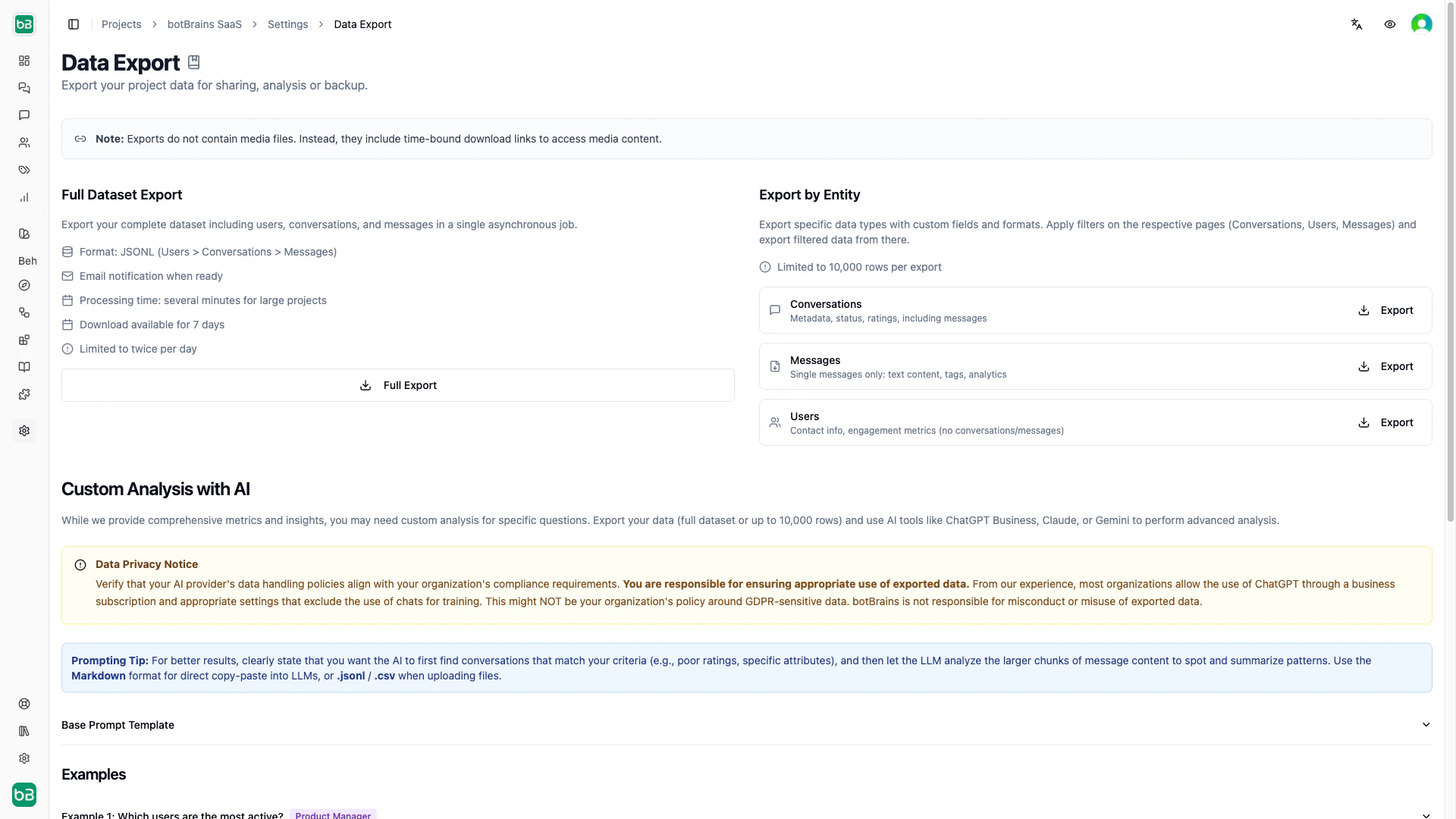
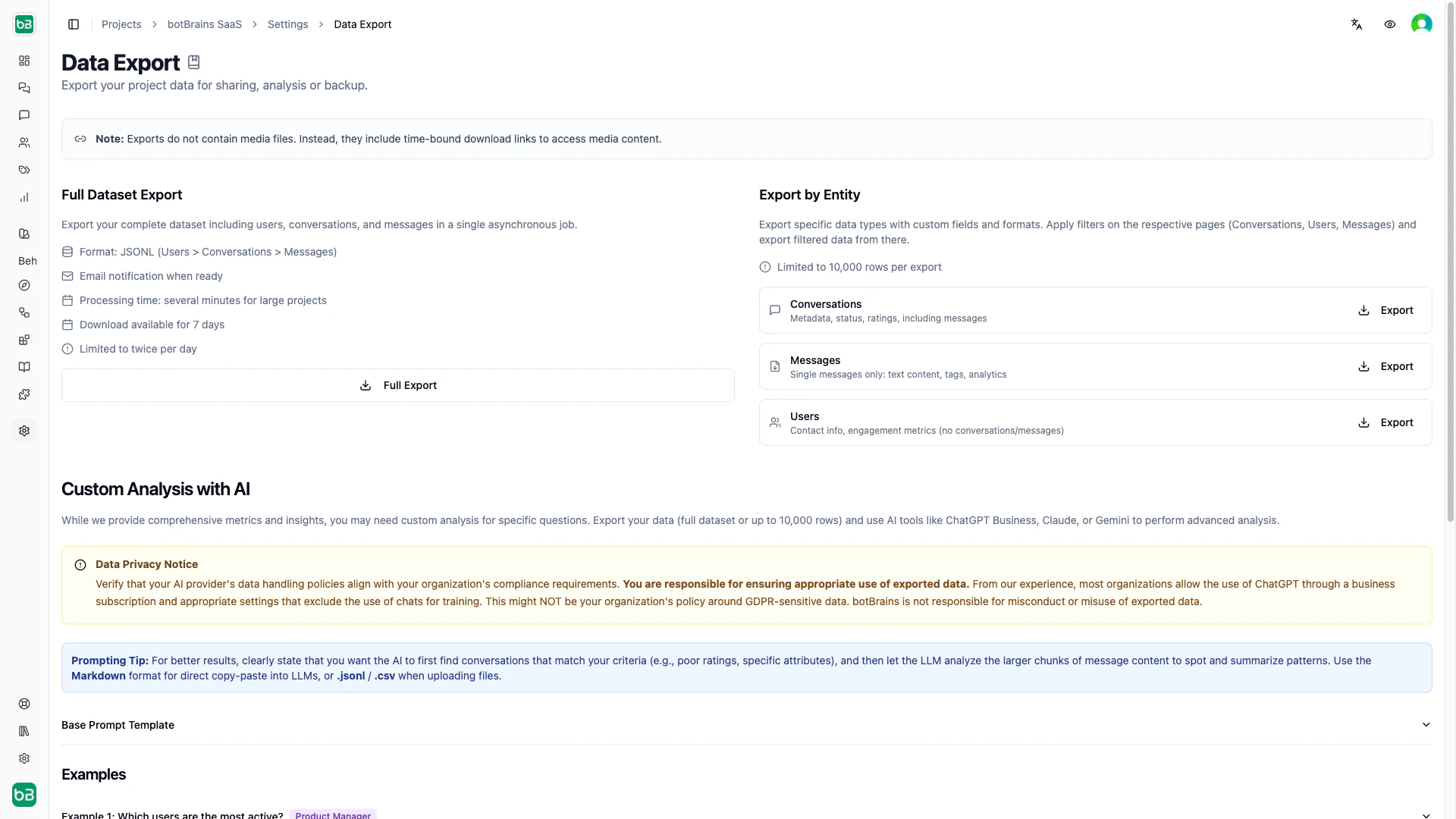
botBrains lets you export conversations, messages, and user data for compliance, custom analytics, or backup. All exports respect your project permissions.
## Export Methods
| | Full Dataset Export | Entity-Specific Export |
| ------------ | ---------------------------------------------------------------------------------------------------------------------------------------- | ---------------------------------------------------------------------------------------------------------------------------------------- |
| **What** | Complete snapshot of all project data | Filtered download of one entity type (Conversations, Messages, or Users) |
| **Format** | JSONL (Users → Conversations → Messages hierarchy) | CSV, JSONL, Excel, or Markdown |
| **How** | [Settings → Data Export](https://platform.botbrains.io/~/settings/data-export), processed in the background, download link sent by email | Export button on any [Conversations](https://platform.botbrains.io/~/conversations), Messages, or Users list page, downloads immediately |
| **Limits** | 2 per day per project; download link valid for 7 days | 10,000 rows per export |
| **Use when** | Full backups, GDPR requests, AI analysis across all data | Filtered subsets, spreadsheet analysis, sharing with stakeholders |
 ## Export Formats
| Format | Best for |
| --------------- | -------------------------------------------------------------------------------------------------- |
| **CSV** | Excel, Google Sheets, quick manual analysis |
| **JSONL** | Programmatic processing, data pipelines, preserving nested data (Users → Conversations → Messages) |
| **Excel (CSV)** | Microsoft Excel with correct UTF-8 encoding and date handling |
| **Markdown** | Copying conversations into an LLM (ChatGPT, Claude) for ad-hoc analysis |
## Export Formats
| Format | Best for |
| --------------- | -------------------------------------------------------------------------------------------------- |
| **CSV** | Excel, Google Sheets, quick manual analysis |
| **JSONL** | Programmatic processing, data pipelines, preserving nested data (Users → Conversations → Messages) |
| **Excel (CSV)** | Microsoft Excel with correct UTF-8 encoding and date handling |
| **Markdown** | Copying conversations into an LLM (ChatGPT, Claude) for ad-hoc analysis |
 If CSV displays special characters incorrectly in Excel, use the Excel (CSV) format or import via Excel's "Get Data" feature with UTF-8 encoding.
## Media Files in Exports
Exports include **time-limited download URLs** for media attachments (images, files), not the files themselves. These URLs expire after 7 days. Download media files after exporting if you need permanent copies.
## Custom Analysis with AI Tools
The Full Dataset Export (JSONL) works well with AI tools like ChatGPT or Claude. Upload the file and use this prompt template:
```
You are a data analyst, using your Code Interpreter / Python Interpreter tools
to write code and answer my questions. You've been given a JSON Lines file, of
the conversations had by the ai-assistant, operators (human agents) and
customers. Each line is a user profile, with all their conversations and all
messages within those conversations, including metadata. For legacy reasons, not
all conversations have a user, so a mock user with
ID 00000000-0000-0000-0000-000000000000 is assigned all other conversations.
Follow this workflow:
1. Familiarize yourself with the data model by looking at the first 5 lines.
2. Think about my question and the appropriate chart / way to answer my question
with the given values.
3. Work to write the code and find appropriate outputs format (chart-type,
tables, singular values...) for the data.
Question: [Your question here]
```
Example questions:
* "Which users send the most messages? Show a table sorted by message count."
* "What common issues do users with `external_attributes.plan = PREMIUM` describe?"
* "Find conversations rated 1–2 and categorize the top complaint themes."
For best results, ask the AI to first filter by your criteria (poor ratings, specific attributes), then analyze the message content to identify patterns.
You are responsible for ensuring exported data complies with your organization's data policies (GDPR, CCPA, etc.) before uploading to external AI tools.
## Next Steps
Filter and review conversations before exporting
Use built-in analytics before resorting to custom exports
If CSV displays special characters incorrectly in Excel, use the Excel (CSV) format or import via Excel's "Get Data" feature with UTF-8 encoding.
## Media Files in Exports
Exports include **time-limited download URLs** for media attachments (images, files), not the files themselves. These URLs expire after 7 days. Download media files after exporting if you need permanent copies.
## Custom Analysis with AI Tools
The Full Dataset Export (JSONL) works well with AI tools like ChatGPT or Claude. Upload the file and use this prompt template:
```
You are a data analyst, using your Code Interpreter / Python Interpreter tools
to write code and answer my questions. You've been given a JSON Lines file, of
the conversations had by the ai-assistant, operators (human agents) and
customers. Each line is a user profile, with all their conversations and all
messages within those conversations, including metadata. For legacy reasons, not
all conversations have a user, so a mock user with
ID 00000000-0000-0000-0000-000000000000 is assigned all other conversations.
Follow this workflow:
1. Familiarize yourself with the data model by looking at the first 5 lines.
2. Think about my question and the appropriate chart / way to answer my question
with the given values.
3. Work to write the code and find appropriate outputs format (chart-type,
tables, singular values...) for the data.
Question: [Your question here]
```
Example questions:
* "Which users send the most messages? Show a table sorted by message count."
* "What common issues do users with `external_attributes.plan = PREMIUM` describe?"
* "Find conversations rated 1–2 and categorize the top complaint themes."
For best results, ask the AI to first filter by your criteria (poor ratings, specific attributes), then analyze the message content to identify patterns.
You are responsible for ensuring exported data complies with your organization's data policies (GDPR, CCPA, etc.) before uploading to external AI tools.
## Next Steps
Filter and review conversations before exporting
Use built-in analytics before resorting to custom exports