> ## Documentation Index
> Fetch the complete documentation index at: https://docs.botbrains.io/llms.txt
> Use this file to discover all available pages before exploring further.
# Data Model
> The four models that make up the botBrains platform
For most users, the [Getting Started Overview](/getting-started/overview) is enough. This page is a deeper reference for how the platform's data models connect.
botBrains organizes your AI operations around four models: **Organization & Projects** for structure, **Users, Conversations & Messages** for customer interactions, **Channels, Aliases & Deployments** for versioned releases, and **guidances, actions & knowledge** for AI behavior.
## Model 1: Organization & Projects
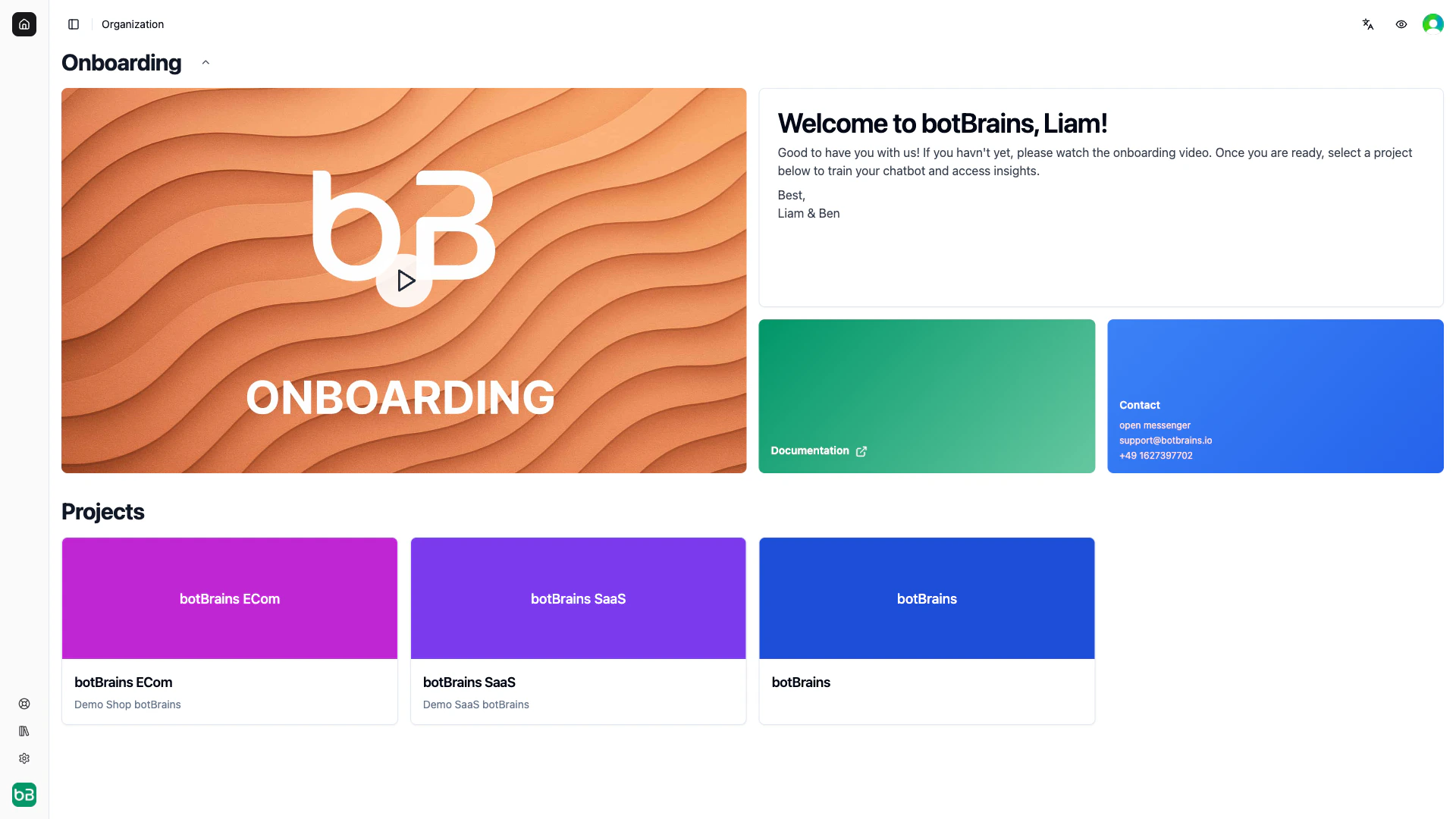
The Organization & Projects model defines how your company structures AI agents and manages team access.
```mermaid theme={null}
graph TB
Org[Organization: Acme Corp]
Org -->|owns| P1[Project: Customer Support]
Org -->|owns| P2[Project: Sales Assistant]
Org -->|owns| P3[Project: Internal IT]
Org -->|manages| Billing[Billing & Subscription]
Org -->|manages| Team[Team Members]
P1 -->|contains| K1[Knowledge Sources]
P1 -->|contains| B1[Behavior Config]
P1 -->|contains| D1[Deployments]
style Org fill:#e1f5ff
style P1 fill:#fff4e6
style P2 fill:#fff4e6
style P3 fill:#fff4e6
```
### Organization
Your **Organization** is the top-level container representing your company's botBrains account. Each account has exactly one organization.
| Contains | Description |
| ---------------- | --------------------------------------------------- |
| **Projects** | Every AI agent you create |
| **Billing** | Subscription plan, usage tracking, payment methods |
| **Team Members** | People with access to manage your botBrains account |
| **Settings** | Default configurations and preferences |
All projects roll up to organization-level billing. Team members can receive access to multiple projects, and admins can access all projects within the organization.
In the botBrains data model, "Organization" and "Account" are often used interchangeably.
### Projects
**Projects** are where the real work happens. Each project is a completely independent AI agent with its own configuration, knowledge base, and deployments.
| Contains | Description |
| -------------------------- | -------------------------------------------------------------- |
| **Knowledge Sources** | Data providers, snippets, and search tables |
| **Behavior Configuration** | Profiles that control guidance, tools, and how the AI responds |
| **Deployments** | Versioned releases of your AI configuration |
| **User Pools** | Collections of users who interact with this project |
| **Integrations** | Channels like website widgets, Zendesk, Salesforce, Slack |
| **Analytics** | Metrics, topics, and insights for this AI agent |
Projects are fully isolated—they don't share knowledge or configurations by default. Each has its own API keys, permissions, and analytics.
 ### When to Create Multiple Projects
| Reason | Example |
| -------------------------------- | ----------------------------------------------------------------------------- |
| **Different products or brands** | Separate AI for each product line, each with its own knowledge base and voice |
| **Different departments** | Sales, support, and technical teams with different escalation workflows |
| **Development stages** | Separate Dev, staging, and production environments |
| **Languages or regions** | Region-specific deployments with localized knowledge |
| **Customer segments** | Enterprise customers get a different AI experience than self-service users |
While multiple projects can integrate with a single Zendesk or Salesforce Service Cloud instance, only one active integration from the third-party platform to botBrains exists at a time. You might need to consolidate multiple use cases into one project.
***
## Model 2: Users, Conversations & Messages
This model captures who your customers are, what they ask about, and their complete interaction history.
```mermaid theme={null}
graph LR
UP[User Pool] --> U1[User: john@example.com]
UP --> U2[User: sarah@business.com]
U1 --> C1[Conversation #1]
U1 --> C2[Conversation #2]
U2 --> C3[Conversation #3]
C1 --> M["Messages (user ↔ assistant)"]
style UP fill:#e8f5e9
style U1 fill:#e3f2fd
style U2 fill:#e3f2fd
style C1 fill:#f3e5f5
style C2 fill:#f3e5f5
style C3 fill:#f3e5f5
```
**Users own conversations.** Each conversation belongs to exactly one user (1-to-many). This is not a group chat model—conversations are between one customer and your AI.
### Users
**Users** represent the people who interact with your AI agent. Each user has a unique identity and maintains conversation history across all interactions.
| Property | Description |
| ------------------------ | --------------------------------------------------------------- |
| **Profile** | Name, email, phone number, identification |
| **Custom Attributes** | Your own data fields for segmentation and personalization |
| **Preferences** | Language, timezone, and other settings |
| **External IDs** | Identifiers from your systems (CRM, support platform, database) |
| **Conversation History** | All conversations this user has ever had |
| **Labels** | Tags for organization and segmentation |
You can identify users by email, phone number, or external ID. The platform tracks anonymous users by device/session until they identify themselves.
Users belong to a **User Pool** scoped to your organization. You can share user pools across projects if needed.
### Conversations
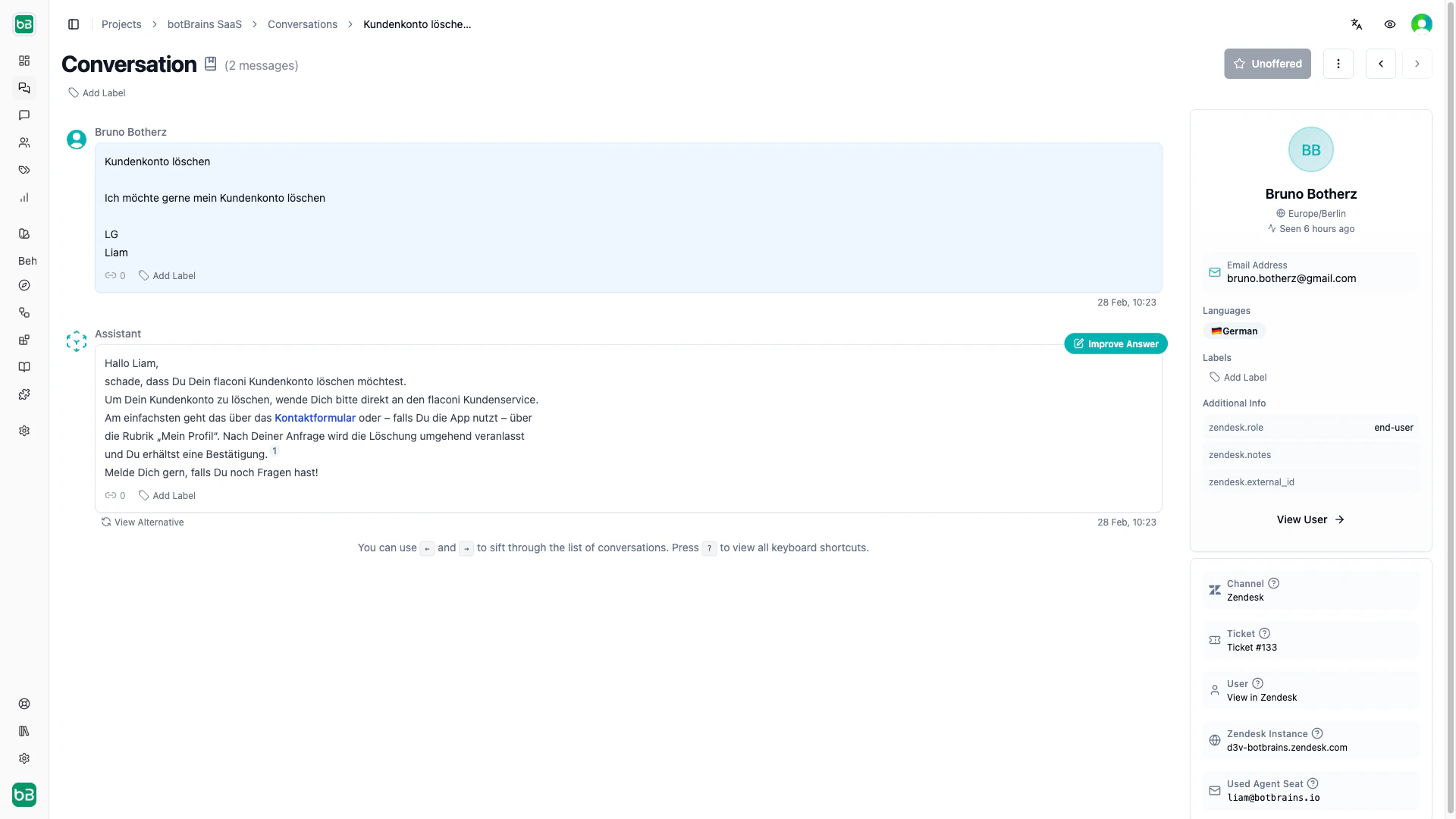
**Conversations** are individual interaction sessions between a user and your AI agent. Each conversation belongs to exactly one user and contains a sequence of messages.
Conversations track status, ratings, timestamps, channel information, labels, and topic classification. They flow through these states:
| Status | Meaning |
| ------------- | ------------------------------------------------ |
| **Active** | Ongoing conversation, user actively participates |
| **Resolved** | Successfully answered |
| **Escalated** | Handed off to human agent |
| **Abandoned** | User stopped responding |
### Messages
**Messages** are the individual exchanges within a conversation. Each message has a role (user, assistant, or operator), text content, optional attachments, and labels. Messages maintain chronological order and are immutable once created.
Message types include standard messages, comments (internal notes from team members, not visible to the user), system-generated notes, and conversation summaries.
### When to Create Multiple Projects
| Reason | Example |
| -------------------------------- | ----------------------------------------------------------------------------- |
| **Different products or brands** | Separate AI for each product line, each with its own knowledge base and voice |
| **Different departments** | Sales, support, and technical teams with different escalation workflows |
| **Development stages** | Separate Dev, staging, and production environments |
| **Languages or regions** | Region-specific deployments with localized knowledge |
| **Customer segments** | Enterprise customers get a different AI experience than self-service users |
While multiple projects can integrate with a single Zendesk or Salesforce Service Cloud instance, only one active integration from the third-party platform to botBrains exists at a time. You might need to consolidate multiple use cases into one project.
***
## Model 2: Users, Conversations & Messages
This model captures who your customers are, what they ask about, and their complete interaction history.
```mermaid theme={null}
graph LR
UP[User Pool] --> U1[User: john@example.com]
UP --> U2[User: sarah@business.com]
U1 --> C1[Conversation #1]
U1 --> C2[Conversation #2]
U2 --> C3[Conversation #3]
C1 --> M["Messages (user ↔ assistant)"]
style UP fill:#e8f5e9
style U1 fill:#e3f2fd
style U2 fill:#e3f2fd
style C1 fill:#f3e5f5
style C2 fill:#f3e5f5
style C3 fill:#f3e5f5
```
**Users own conversations.** Each conversation belongs to exactly one user (1-to-many). This is not a group chat model—conversations are between one customer and your AI.
### Users
**Users** represent the people who interact with your AI agent. Each user has a unique identity and maintains conversation history across all interactions.
| Property | Description |
| ------------------------ | --------------------------------------------------------------- |
| **Profile** | Name, email, phone number, identification |
| **Custom Attributes** | Your own data fields for segmentation and personalization |
| **Preferences** | Language, timezone, and other settings |
| **External IDs** | Identifiers from your systems (CRM, support platform, database) |
| **Conversation History** | All conversations this user has ever had |
| **Labels** | Tags for organization and segmentation |
You can identify users by email, phone number, or external ID. The platform tracks anonymous users by device/session until they identify themselves.
Users belong to a **User Pool** scoped to your organization. You can share user pools across projects if needed.
### Conversations
**Conversations** are individual interaction sessions between a user and your AI agent. Each conversation belongs to exactly one user and contains a sequence of messages.
Conversations track status, ratings, timestamps, channel information, labels, and topic classification. They flow through these states:
| Status | Meaning |
| ------------- | ------------------------------------------------ |
| **Active** | Ongoing conversation, user actively participates |
| **Resolved** | Successfully answered |
| **Escalated** | Handed off to human agent |
| **Abandoned** | User stopped responding |
### Messages
**Messages** are the individual exchanges within a conversation. Each message has a role (user, assistant, or operator), text content, optional attachments, and labels. Messages maintain chronological order and are immutable once created.
Message types include standard messages, comments (internal notes from team members, not visible to the user), system-generated notes, and conversation summaries.
 ***
## Model 3: Channels, Aliases & Deployments
This model defines how you deploy AI versions across platforms. It separates configuration development from production deployment, enabling safe updates and version control.
```mermaid theme={null}
graph LR
W[Website Widget] --> PA[Production Alias]
Z[Zendesk] --> PA
SF[Salesforce] --> PA
SL[Slack] --> SA[Staging Alias]
PA --> V5["Version #5 (active)"]
SA --> V4[Version #4]
style PA fill:#fff4e6
style SA fill:#fff4e6
style V5 fill:#e8f5e9
style V4 fill:#f5f5f5
```
### Channels
**Channels** are the platforms where users interact with your AI. You can have multiple channels of the same type (for example, multiple website widgets for different sites).
| Channel | Description |
| ---------------------------- | ---------------------------------------------------------------------------- |
| **Website** | Chat widget embedded on your website. Three modes: launcher, inline, iframe. |
| **Zendesk** | Automates ticket responses, predicts fields, handles ticket workflows. |
| **Salesforce Service Cloud** | Responds to cases, populates fields, manages case workflows. |
| **Slack** | DM the bot or mention it in channels. |
| **WhatsApp** | Messaging platform integration (coming soon). |
Channels connect to an **alias**, not directly to a version. This means you update once and all connected channels switch automatically.
### Aliases
An **alias** is a named pointer to a specific deployment version. Think of it as a bookmark—channels connect to "Production," and you control which version "Production" points to.
| Type | Description |
| ------------- | ------------------------------------------------------------------------------------- |
| **Mutable** | You can update to point to different versions. Used for "Production," "Staging," etc. |
| **Immutable** | Once set, always points to the same version. Used for rollback points. |
When you update an alias, all connected channels switch immediately with no downtime.
### Deployments (Versions)
**Deployments** are sequentially numbered, immutable snapshots of your AI's complete configuration at a specific point in time. Each version contains the profile configuration (guidance, tools, LLM settings), a knowledge snapshot (all sources at build time), and metadata.
**Knowledge is versioned.** Changes to data providers don't affect deployed channels until you build a new version. This keeps deployed behavior stable and rollback-safe.
Learn more in the [Versioning Guide](/concepts/versioning).
***
## Model 4: Guidance, Actions & Knowledge
These three components live inside **Profiles** and together define how your AI behaves, what it can do, and what it knows.
```mermaid theme={null}
graph TD
Prof[Profile v0.5] --> G[Guidances]
Prof --> A[Actions]
Prof --> K[Knowledge]
G --> |"instructions + allowed_tools"| AI[AI Response]
A --> |"tools, MCP servers, triggers"| AI
K --> |"data providers, snippets, embeddings"| AI
style Prof fill:#fff4e6
style G fill:#e3f2fd
style A fill:#e8f5e9
style K fill:#f3e5f5
```
### Guidance Rules
**Guidance rules** control how your AI behaves. Each guidance contains natural language instructions, tool permissions (`allowed_tools`), audience rules for when it applies, and an active/draft state. Multiple guidances evaluate in priority order.
When you reference tools in instructions using backticks (for example, `` `search_orders` ``), botBrains automatically detects them and manages the `allowed_tools` list.
### Actions
**Actions** are tools and capabilities your AI can execute:
| Type | Description |
| ------------------ | -------------------------------------------------------------------------------------------------------- |
| **Built-in Tools** | Web search, fetch web pages, offer handoff, escalate to human, search knowledge |
| **Search Tables** | Structured data (CSV, JSON) queryable with filters and ranges |
| **MCP Servers** | External integrations via Model Context Protocol (Salesforce, Stripe, Shopify, Zapier, or your own APIs) |
| **Triggers** | Automated rules that fire before the AI responds (block, assign/unassign label) |
Tools configured in Actions become available for guidances to reference. For sensitive actions, you can require user approval before execution.
### Knowledge
**Knowledge** is your AI's information foundation—the sources it draws upon for accurate, grounded responses.
| Component | Description |
| ----------------------- | ----------------------------------------------------------------- |
| **Data Providers** | Sources of content: web crawler, Confluence, or manual (snippets) |
| **Sources** | Individual documents/pages within providers |
| **Chunks & Embeddings** | Indexed segments with vector representations for semantic search |
Knowledge supports audience filtering per source—for example, enterprise-only documentation. Every AI response tracks which sources informed it, and users can view source attributions.
When you build a deployment, the system captures all three components (guidances, actions, knowledge) into an immutable version. Changes to any of them require a new build and deploy.
## Related Documentation
Writing effective guidance instructions
Configuring tools and integrations
Managing data providers and knowledge sources
User management and identification
Building and managing deployments
Connecting your AI to platforms
***
## Model 3: Channels, Aliases & Deployments
This model defines how you deploy AI versions across platforms. It separates configuration development from production deployment, enabling safe updates and version control.
```mermaid theme={null}
graph LR
W[Website Widget] --> PA[Production Alias]
Z[Zendesk] --> PA
SF[Salesforce] --> PA
SL[Slack] --> SA[Staging Alias]
PA --> V5["Version #5 (active)"]
SA --> V4[Version #4]
style PA fill:#fff4e6
style SA fill:#fff4e6
style V5 fill:#e8f5e9
style V4 fill:#f5f5f5
```
### Channels
**Channels** are the platforms where users interact with your AI. You can have multiple channels of the same type (for example, multiple website widgets for different sites).
| Channel | Description |
| ---------------------------- | ---------------------------------------------------------------------------- |
| **Website** | Chat widget embedded on your website. Three modes: launcher, inline, iframe. |
| **Zendesk** | Automates ticket responses, predicts fields, handles ticket workflows. |
| **Salesforce Service Cloud** | Responds to cases, populates fields, manages case workflows. |
| **Slack** | DM the bot or mention it in channels. |
| **WhatsApp** | Messaging platform integration (coming soon). |
Channels connect to an **alias**, not directly to a version. This means you update once and all connected channels switch automatically.
### Aliases
An **alias** is a named pointer to a specific deployment version. Think of it as a bookmark—channels connect to "Production," and you control which version "Production" points to.
| Type | Description |
| ------------- | ------------------------------------------------------------------------------------- |
| **Mutable** | You can update to point to different versions. Used for "Production," "Staging," etc. |
| **Immutable** | Once set, always points to the same version. Used for rollback points. |
When you update an alias, all connected channels switch immediately with no downtime.
### Deployments (Versions)
**Deployments** are sequentially numbered, immutable snapshots of your AI's complete configuration at a specific point in time. Each version contains the profile configuration (guidance, tools, LLM settings), a knowledge snapshot (all sources at build time), and metadata.
**Knowledge is versioned.** Changes to data providers don't affect deployed channels until you build a new version. This keeps deployed behavior stable and rollback-safe.
Learn more in the [Versioning Guide](/concepts/versioning).
***
## Model 4: Guidance, Actions & Knowledge
These three components live inside **Profiles** and together define how your AI behaves, what it can do, and what it knows.
```mermaid theme={null}
graph TD
Prof[Profile v0.5] --> G[Guidances]
Prof --> A[Actions]
Prof --> K[Knowledge]
G --> |"instructions + allowed_tools"| AI[AI Response]
A --> |"tools, MCP servers, triggers"| AI
K --> |"data providers, snippets, embeddings"| AI
style Prof fill:#fff4e6
style G fill:#e3f2fd
style A fill:#e8f5e9
style K fill:#f3e5f5
```
### Guidance Rules
**Guidance rules** control how your AI behaves. Each guidance contains natural language instructions, tool permissions (`allowed_tools`), audience rules for when it applies, and an active/draft state. Multiple guidances evaluate in priority order.
When you reference tools in instructions using backticks (for example, `` `search_orders` ``), botBrains automatically detects them and manages the `allowed_tools` list.
### Actions
**Actions** are tools and capabilities your AI can execute:
| Type | Description |
| ------------------ | -------------------------------------------------------------------------------------------------------- |
| **Built-in Tools** | Web search, fetch web pages, offer handoff, escalate to human, search knowledge |
| **Search Tables** | Structured data (CSV, JSON) queryable with filters and ranges |
| **MCP Servers** | External integrations via Model Context Protocol (Salesforce, Stripe, Shopify, Zapier, or your own APIs) |
| **Triggers** | Automated rules that fire before the AI responds (block, assign/unassign label) |
Tools configured in Actions become available for guidances to reference. For sensitive actions, you can require user approval before execution.
### Knowledge
**Knowledge** is your AI's information foundation—the sources it draws upon for accurate, grounded responses.
| Component | Description |
| ----------------------- | ----------------------------------------------------------------- |
| **Data Providers** | Sources of content: web crawler, Confluence, or manual (snippets) |
| **Sources** | Individual documents/pages within providers |
| **Chunks & Embeddings** | Indexed segments with vector representations for semantic search |
Knowledge supports audience filtering per source—for example, enterprise-only documentation. Every AI response tracks which sources informed it, and users can view source attributions.
When you build a deployment, the system captures all three components (guidances, actions, knowledge) into an immutable version. Changes to any of them require a new build and deploy.
## Related Documentation
Writing effective guidance instructions
Configuring tools and integrations
Managing data providers and knowledge sources
User management and identification
Building and managing deployments
Connecting your AI to platforms