> ## Documentation Index
> Fetch the complete documentation index at: https://docs.botbrains.io/llms.txt
> Use this file to discover all available pages before exploring further.
# Knowledge
> How botBrains uses knowledge to answer questions
Knowledge is the foundation of your AI's ability to provide accurate, helpful responses. It transforms your documentation, support articles, and internal information into a searchable system that powers intelligent conversations with your customers.
## Why Knowledge Matters
Without knowledge, your AI can only provide generic responses based on its training data. With a well-structured knowledge system, your AI can:
* **Answer specific questions** about your products, services, and policies
* **Provide accurate information** grounded in your actual documentation
* **Stay up-to-date** as you add or modify content
* **Cite sources** so users can verify information
* **Reduce hallucinations** by retrieving facts instead of generating guesses
Knowledge is what makes you AI agent truly yours - it's the difference between a generic chatbot and an expert on your business.
## How Knowledge Retrieval Works
When a user asks a question, botBrains follows a multi-step process to find and use relevant information:
### 1. Question Analysis
The system analyzes the user's question to understand what information it needs. This includes:
* Extracting key concepts and entities
* Understanding the user's intent
* Considering conversation context and history
### 2. Source Retrieval
botBrains searches through your knowledge sources using advanced retrieval techniques:
* **Vector similarity search**: Finds semantically similar content, even when exact words don't match
* **Chunk-level retrieval**: Breaks documents into manageable pieces to find precise information
* **Audience filtering**: Only searches sources relevant to the user's audience (if configured)
The system retrieves multiple candidate sources that might contain relevant information.
### 3. Response Generation
The AI synthesizes information from retrieved sources to:
* Answer the user's question directly
* Combine information from multiple sources when needed
* Maintain your brand voice and style (defined in [Guidance](/concepts/guidance))
* Include source attributions so users can verify the information
### 4. Source Attribution
After generating a response, the system tracks which sources it used, allowing you to:
* See exactly what knowledge informed each answer
* Identify gaps where information is missing or unclear
* Improve your knowledge base based on real usage patterns
## Knowledge Architecture
Your knowledge system consists of several components working together:
### Data Providers
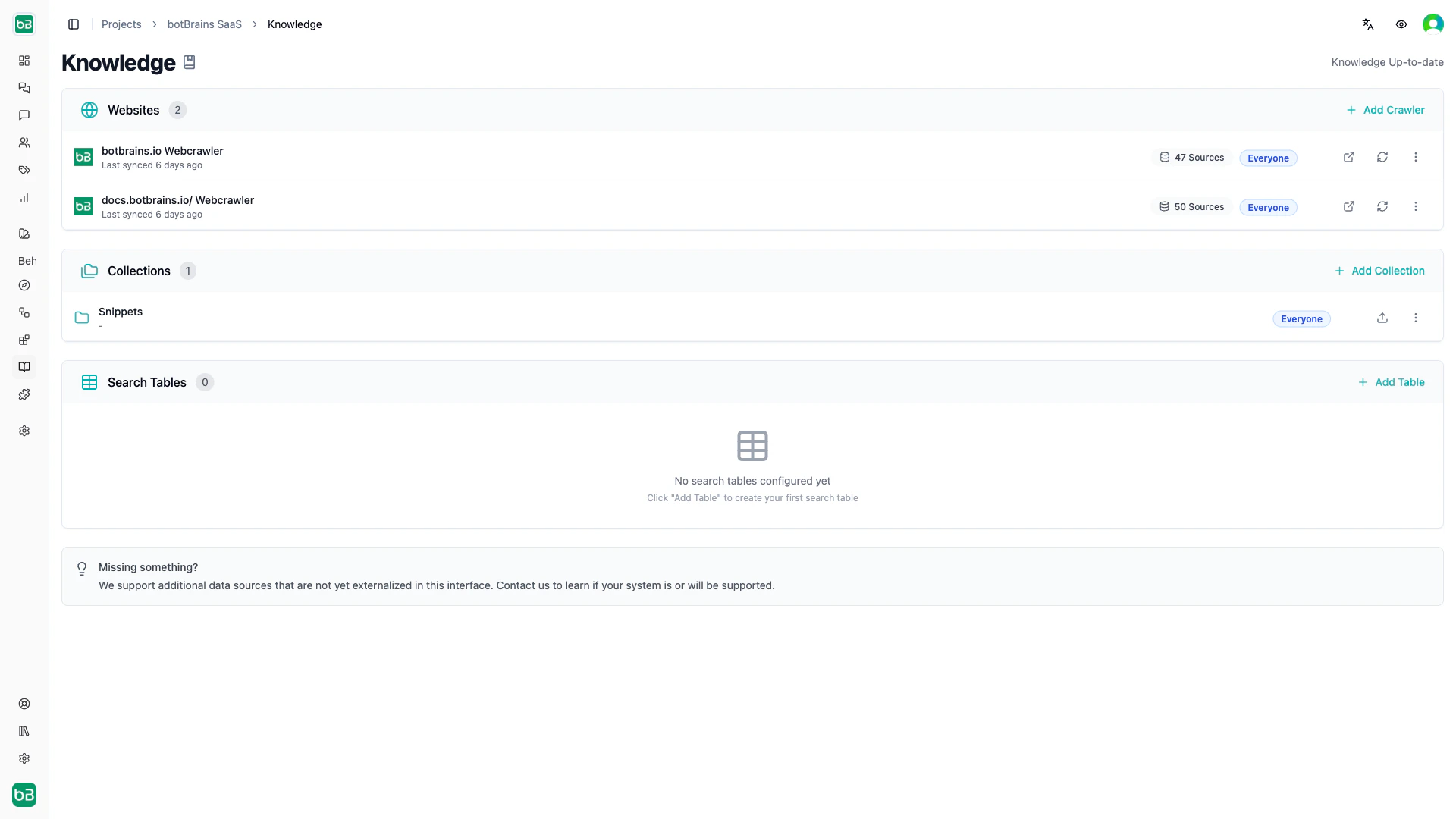
Data providers are the sources of your knowledge. Each provider represents a distinct collection of information:
* **Web Crawler**: Automatically syncs content from websites
* **Confluence**: Connects to Confluence spaces
* **Human (Snippets)**: Manually created and curated content
Learn more in [Data Providers](/concepts/data-providers).
 ### Sources
Sources are the individual documents, pages, or pieces of content within a data provider:
* Web pages crawled from your site
* Confluence pages
* Uploaded PDFs or documents
* [Snippets](/concepts/snippets) you create manually
Each source is:
* **Chunked** into smaller segments for precise retrieval
* **Embedded** as vectors for semantic search
* **Indexed** for fast retrieval during conversations
* **Versioned** through snapshots to track changes
### Snapshots
Snapshots capture the state of a data provider at a specific point in time:
* The system creates them automatically when content syncs or updates
* Include all sources and their processed chunks
* Allow you to see how your knowledge has evolved
* You can deploy them to make content available to your AI
Snapshots ensure your AI always works with a consistent, tested version of your knowledge while you continue to make updates.
### Chunks and Embeddings
Behind the scenes, botBrains processes your sources into retrievable units:
1. **Chunking**: The system splits long documents into smaller segments (chunks) of related content
2. **Embedding**: The system converts each chunk into a vector representation that captures its semantic meaning
3. **Indexing**: The system stores vectors in a database optimized for fast similarity search
This processing happens automatically when you sync a data provider.
## Knowledge in Action
### Example: Customer Question
Let's see how knowledge powers a real interaction:
**User Question**: "What's your refund policy for annual subscriptions?"
**What Happens**:
1. The system searches your knowledge base for content about refunds and subscriptions
2. It finds relevant chunks from your "Terms of Service" page and "Billing FAQ" snippet
3. The AI synthesizes this information into a clear answer
4. Source attributions show exactly which documents the AI used
**Response**: "Our refund policy for annual subscriptions allows for a full refund within 30 days of purchase. After 30 days, we prorate refunds based on usage. \[View full policy →]"
### Viewing Sources Used
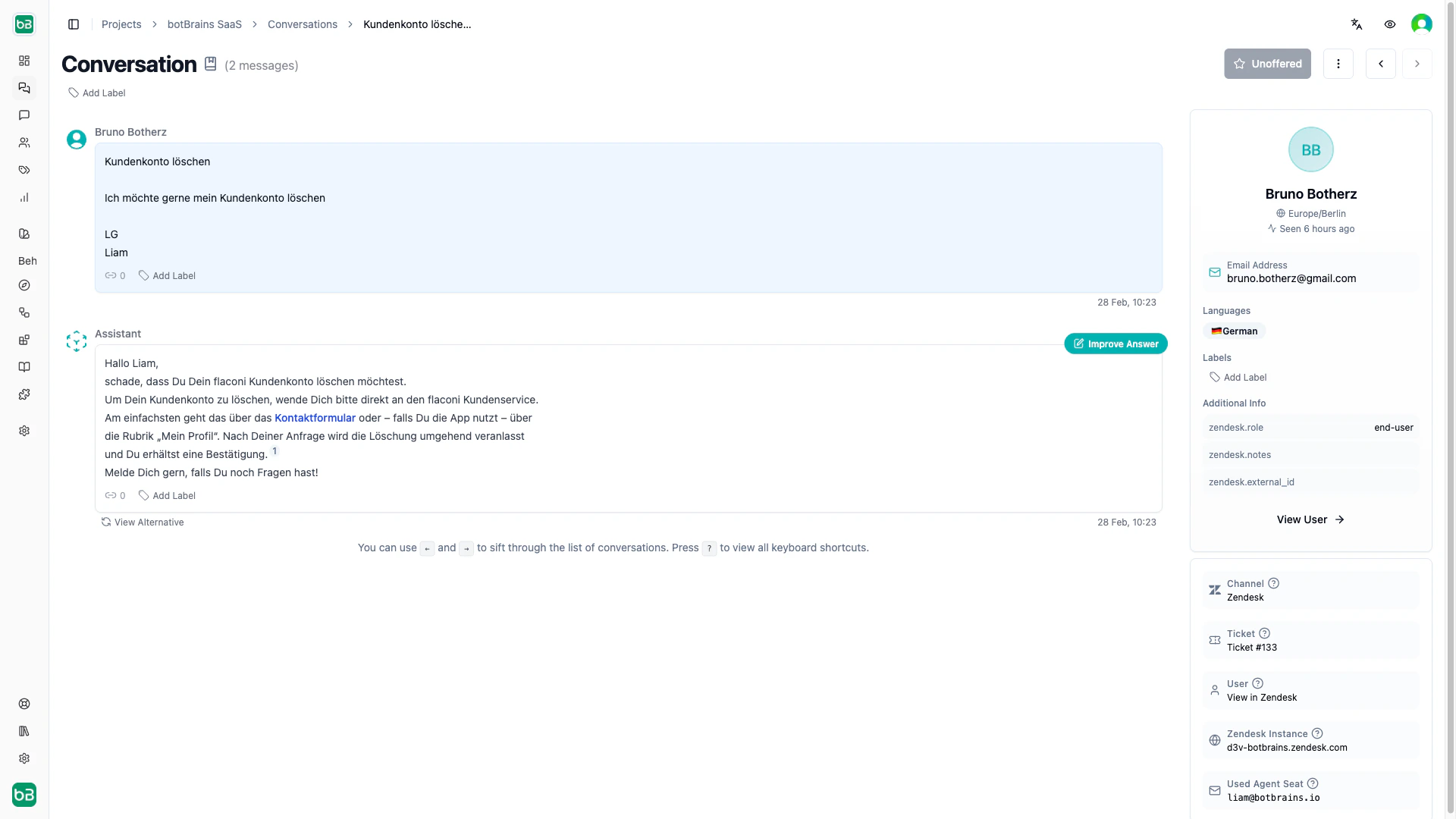
In the botBrains platform, you can see exactly which knowledge sources the AI used for any message:
1. Open a conversation in the [Analyze](/concepts/conversations) section
2. Click on an AI message
3. Open the Knowledge sidebar to see:
* **Used Sources**: Documents that the AI cited in its response
* **Available Sources**: Other relevant content that the system retrieved but the AI didn't use
* **Snippets**: Specific text excerpts that informed the answer
This transparency helps you understand and improve your AI's knowledge.
### Sources
Sources are the individual documents, pages, or pieces of content within a data provider:
* Web pages crawled from your site
* Confluence pages
* Uploaded PDFs or documents
* [Snippets](/concepts/snippets) you create manually
Each source is:
* **Chunked** into smaller segments for precise retrieval
* **Embedded** as vectors for semantic search
* **Indexed** for fast retrieval during conversations
* **Versioned** through snapshots to track changes
### Snapshots
Snapshots capture the state of a data provider at a specific point in time:
* The system creates them automatically when content syncs or updates
* Include all sources and their processed chunks
* Allow you to see how your knowledge has evolved
* You can deploy them to make content available to your AI
Snapshots ensure your AI always works with a consistent, tested version of your knowledge while you continue to make updates.
### Chunks and Embeddings
Behind the scenes, botBrains processes your sources into retrievable units:
1. **Chunking**: The system splits long documents into smaller segments (chunks) of related content
2. **Embedding**: The system converts each chunk into a vector representation that captures its semantic meaning
3. **Indexing**: The system stores vectors in a database optimized for fast similarity search
This processing happens automatically when you sync a data provider.
## Knowledge in Action
### Example: Customer Question
Let's see how knowledge powers a real interaction:
**User Question**: "What's your refund policy for annual subscriptions?"
**What Happens**:
1. The system searches your knowledge base for content about refunds and subscriptions
2. It finds relevant chunks from your "Terms of Service" page and "Billing FAQ" snippet
3. The AI synthesizes this information into a clear answer
4. Source attributions show exactly which documents the AI used
**Response**: "Our refund policy for annual subscriptions allows for a full refund within 30 days of purchase. After 30 days, we prorate refunds based on usage. \[View full policy →]"
### Viewing Sources Used
In the botBrains platform, you can see exactly which knowledge sources the AI used for any message:
1. Open a conversation in the [Analyze](/concepts/conversations) section
2. Click on an AI message
3. Open the Knowledge sidebar to see:
* **Used Sources**: Documents that the AI cited in its response
* **Available Sources**: Other relevant content that the system retrieved but the AI didn't use
* **Snippets**: Specific text excerpts that informed the answer
This transparency helps you understand and improve your AI's knowledge.
 ## Best Practices
### Use Snippets for Precision
Create [snippets](/concepts/snippets) for:
* Semi-Public Information that shouldn't be directly published.
* Policy statements that must be exact
* Information that needs to override crawled content (we strongly suggest fixing the source if possible)
* Temporary updates before you update your main docs
Snippets give you fine-grained control over what your AI knows.
### Keep Content Updated
Set up automatic syncing for web crawlers so your AI stays current:
* Schedule daily or weekly syncs for documentation sites
* Manually trigger syncs after major content updates or timely updates
* Review the Knowledge sidebar to identify outdated information
### Monitor Knowledge Usage
Use the Knowledge sidebar that opens on "Improve Answer" in conversations to:
* Identify which sources are most valuable
* Find questions where relevant knowledge is missing
* Discover content that needs clarification or expansion
Changes to sources don't take effect immediately. You must sync the data provider to create a new snapshot, then deploy that snapshot for it to be available in conversations.
## Next Steps
Now that you understand how knowledge works, explore how to:
* [Set up Data Providers](/concepts/data-providers) to connect your knowledge sources
* [Create Snippets](/concepts/snippets) for precise, curated information
* [Improve Answers](/guides/improve-answers) by analyzing which knowledge the AI uses and gets wrong
* [Configure Audiences](/concepts/audiences) to show relevant knowledge to different users
## Best Practices
### Use Snippets for Precision
Create [snippets](/concepts/snippets) for:
* Semi-Public Information that shouldn't be directly published.
* Policy statements that must be exact
* Information that needs to override crawled content (we strongly suggest fixing the source if possible)
* Temporary updates before you update your main docs
Snippets give you fine-grained control over what your AI knows.
### Keep Content Updated
Set up automatic syncing for web crawlers so your AI stays current:
* Schedule daily or weekly syncs for documentation sites
* Manually trigger syncs after major content updates or timely updates
* Review the Knowledge sidebar to identify outdated information
### Monitor Knowledge Usage
Use the Knowledge sidebar that opens on "Improve Answer" in conversations to:
* Identify which sources are most valuable
* Find questions where relevant knowledge is missing
* Discover content that needs clarification or expansion
Changes to sources don't take effect immediately. You must sync the data provider to create a new snapshot, then deploy that snapshot for it to be available in conversations.
## Next Steps
Now that you understand how knowledge works, explore how to:
* [Set up Data Providers](/concepts/data-providers) to connect your knowledge sources
* [Create Snippets](/concepts/snippets) for precise, curated information
* [Improve Answers](/guides/improve-answers) by analyzing which knowledge the AI uses and gets wrong
* [Configure Audiences](/concepts/audiences) to show relevant knowledge to different users