> ## Documentation Index
> Fetch the complete documentation index at: https://docs.botbrains.io/llms.txt
> Use this file to discover all available pages before exploring further.
# Message Search
> Find and analyze specific messages across all conversations
Message Search lets you search the content of individual messages across all conversations. Use it to discover knowledge gaps, validate AI responses, and identify patterns in how users phrase their questions.
Open the [message search](https://platform.botbrains.io/~/messages/search) to get started.
## Search Syntax
The search bar supports full-text search with operators.
 | Syntax | Example | Effect |
| ----------------------------- | ------------------------- | ----------------------------------------- |
| Single word | `refund` | Messages containing "refund" |
| Multiple words (implicit AND) | `refund policy` | Messages containing both words |
| OR | `refund or cancellation` | Messages containing either word |
| NOT (minus) | `refund -approved` | Messages with "refund" but not "approved" |
| Exact phrase (quotes) | `"annual subscription"` | Messages with the exact phrase |
| Combined | `"password reset" -email` | Exact phrase excluding a term |
## Filters
Beyond text search, narrow results with these filters:
| Filter | Options | Use case |
| ------------- | --------------------------------------------- | ------------------------------------------------------- |
| Date range | Last 7/30/90 days, custom | Focus on a specific time window |
| Channel | Website, Zendesk, Salesforce, Slack, WhatsApp | Compare AI performance across channels |
| Rating | 1–5 stars, abandoned, unoffered | Find messages from poorly or highly rated conversations |
| Completeness | Complete, partial, no answer | Identify knowledge gaps (filter to "no answer") |
| Sentiment | Positive, neutral, negative | Find frustration points or successful patterns |
| Language | English, German, Spanish, etc. | Analyze multilingual performance |
| File types | Image, PDF, document, video, audio | Find messages with attachments |
| Visited pages | URL or path | See what users ask on specific pages (web channel) |
| Handoff | Offered, accepted, requested, none | Understand escalation patterns |
| Labels | Has / doesn't have specific labels | Segment by your custom categories |
All active filters appear as removable chips below the search bar. Click any chip to remove it, or "Clear All" to reset.
## Working with Results
Results display as message cards showing the message content, sender, timestamp, sentiment, and a link to the full conversation. Results load progressively as you scroll.
| Syntax | Example | Effect |
| ----------------------------- | ------------------------- | ----------------------------------------- |
| Single word | `refund` | Messages containing "refund" |
| Multiple words (implicit AND) | `refund policy` | Messages containing both words |
| OR | `refund or cancellation` | Messages containing either word |
| NOT (minus) | `refund -approved` | Messages with "refund" but not "approved" |
| Exact phrase (quotes) | `"annual subscription"` | Messages with the exact phrase |
| Combined | `"password reset" -email` | Exact phrase excluding a term |
## Filters
Beyond text search, narrow results with these filters:
| Filter | Options | Use case |
| ------------- | --------------------------------------------- | ------------------------------------------------------- |
| Date range | Last 7/30/90 days, custom | Focus on a specific time window |
| Channel | Website, Zendesk, Salesforce, Slack, WhatsApp | Compare AI performance across channels |
| Rating | 1–5 stars, abandoned, unoffered | Find messages from poorly or highly rated conversations |
| Completeness | Complete, partial, no answer | Identify knowledge gaps (filter to "no answer") |
| Sentiment | Positive, neutral, negative | Find frustration points or successful patterns |
| Language | English, German, Spanish, etc. | Analyze multilingual performance |
| File types | Image, PDF, document, video, audio | Find messages with attachments |
| Visited pages | URL or path | See what users ask on specific pages (web channel) |
| Handoff | Offered, accepted, requested, none | Understand escalation patterns |
| Labels | Has / doesn't have specific labels | Segment by your custom categories |
All active filters appear as removable chips below the search bar. Click any chip to remove it, or "Clear All" to reset.
## Working with Results
Results display as message cards showing the message content, sender, timestamp, sentiment, and a link to the full conversation. Results load progressively as you scroll.
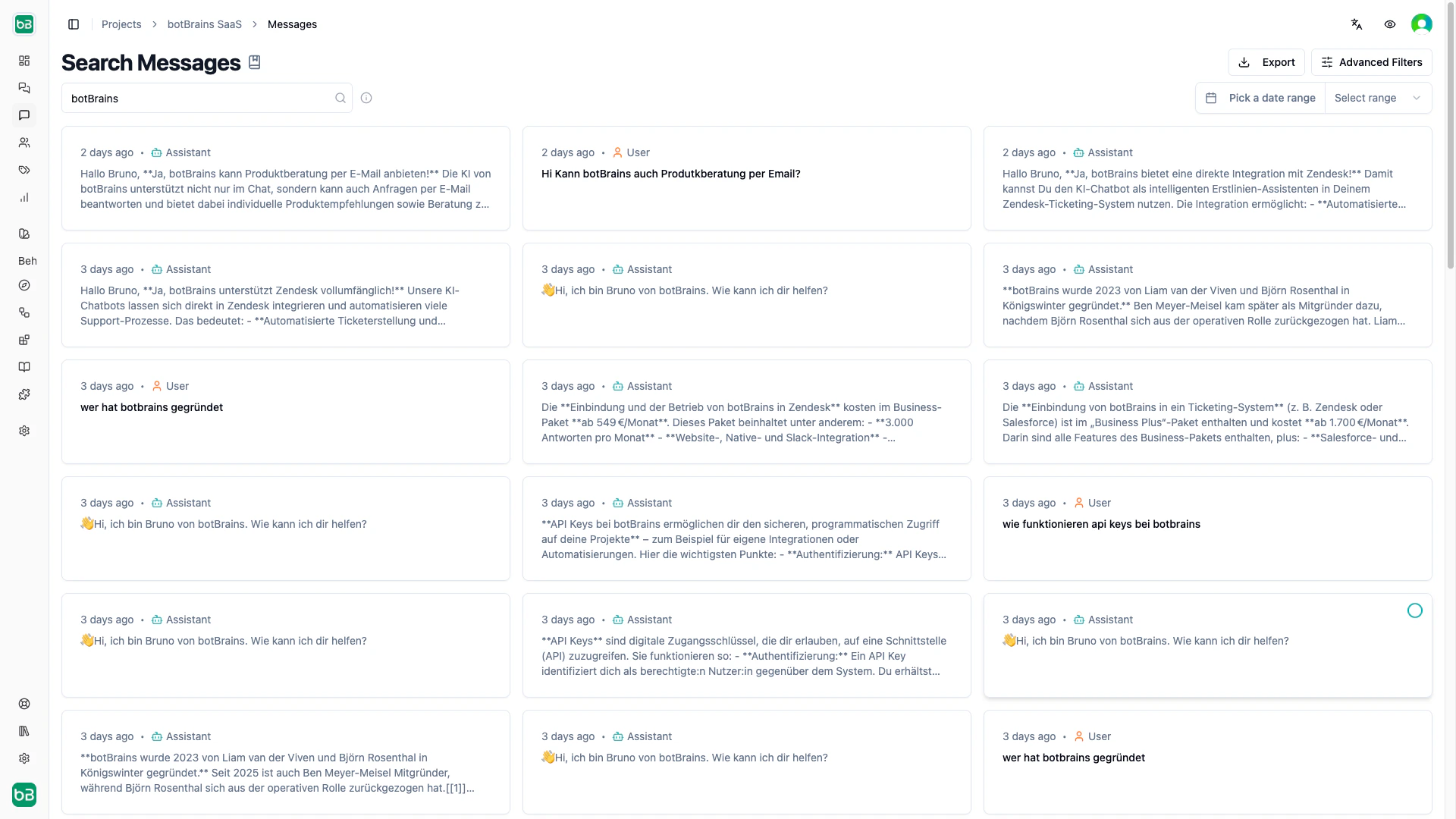 Select multiple messages via checkboxes to apply labels in bulk or export the selection.
## Exporting
Click **Export** to download results as CSV (for spreadsheets) or JSON (for programmatic analysis). Exports respect all active filters, so you only get the messages that match your current search.
## Next Steps
* [Conversations](/concepts/conversations) - View complete conversation threads
* [Topics](/concepts/topics) - Understand automatic topic detection
* [Improve Answers](/guides/improve-answers) - Use search findings to refine knowledge and guidance
* [Labels](/concepts/labels) - Label conversations you find for follow-up tracking
Select multiple messages via checkboxes to apply labels in bulk or export the selection.
## Exporting
Click **Export** to download results as CSV (for spreadsheets) or JSON (for programmatic analysis). Exports respect all active filters, so you only get the messages that match your current search.
## Next Steps
* [Conversations](/concepts/conversations) - View complete conversation threads
* [Topics](/concepts/topics) - Understand automatic topic detection
* [Improve Answers](/guides/improve-answers) - Use search findings to refine knowledge and guidance
* [Labels](/concepts/labels) - Label conversations you find for follow-up tracking