> ## Documentation Index
> Fetch the complete documentation index at: https://docs.botbrains.io/llms.txt
> Use this file to discover all available pages before exploring further.
# Procedures
> Model complex processes with structured, step-by-step workflows your AI agent follows deterministically
Procedures are currently in beta. Features and behavior may change.
Procedures let you define structured workflows for complex customer interactions like refunds, returns, or account changes. Unlike [guidance](/concepts/guidance), which shapes general behavior, a procedure is a step-by-step process that your AI agent triggers and follows from start to finish.
Think of procedures as digital Standard Operating Procedures (SOPs). You define the steps, branching logic, and guardrails. The AI agent handles the conversation within that structure.
## Why Use Procedures
**Guidance** tells your AI agent *how to behave*. **Procedures** tell it *what to do*, step by step, with enforced rules.
The key difference: procedures support **conditional branches** with language, code, and [audience](/concepts/audiences) rules. This means you can formally enforce that certain actions **only happen when conditions match**. Guarantee eligibility before processing a refund, verify identity before sharing account details, or restrict actions to specific customer segments.
| | Guidance | Procedures |
| --------------- | ----------------------------- | ------------------------------------------------- |
| **Purpose** | Shape behavior and tone | Execute multi-step processes |
| **Structure** | Free-form instructions | Ordered steps with control flow |
| **Logic** | No branching | If/else conditions, code checks |
| **Enforcement** | Agent interprets on its own | Deterministic, agent must follow the defined path |
| **Use cases** | Tone, policies, general rules | Refunds, returns, verifications, escalations |
## How Procedures Work
When a customer message matches a procedure's trigger, the AI agent activates it and follows the defined steps. The agent still communicates in a conversational way, but the procedure's structure governs its actions and decisions.
Unlike rigid code-based workflows, the AI agent navigates procedures intelligently. It can **complete multiple steps in a single response** when it already has the information it needs, such as looking up an order and checking eligibility in one go. Equally, it can **stay on a single step** and re-ask the customer if they fail to provide the required information. The agent adapts to the conversation rather than advancing through a fixed sequence.
You compose procedures from **blocks**. Each block represents a step or decision point.
| Block | Description |
| ----------------- | -------------------------------------------------------------------------------------------------------- |
| **Instruction** | Natural language directions for what the agent should do or say. Reference tools with `@tool_name`. |
| **Condition** | If/else if/else branching with three predicate types: language, code, and audience rules. |
| **Escalate** | Hand the conversation to a human agent. |
| **Run** | Call another procedure as a sub-procedure, then return to the current one. |
| **Switch** | Transfer control to another procedure entirely (no return). |
| **goto / Target** | Jump to a named section within the procedure. Targets are section markers, goto blocks navigate to them. |
| **End** | Terminate the procedure and cleanly exit the current branch. |
### Condition Predicates
Conditions support three predicate types for branching:
* **Language** predicates let the AI evaluate natural language conditions (for example, "the customer purchased the item within 30 days")
* **Code** predicates run deterministic checks using code (for example, date calculations, amount thresholds)
* **Audience** predicates branch based on [audience](/concepts/audiences) segments (for example, customer tier, channel, location)
Use audience and code predicates when you need **guaranteed enforcement**. Language predicates are flexible but rely on AI interpretation. Code and audience predicates are deterministic: they either match or they don't.
## Example: Refund Request
```yaml theme={null}
name: "Process Refund"
description: "Handle refund requests for orders"
procedure:
main:
- "Ask the customer for their order number and look it up using @get_order_details."
- "Confirm the order details with the customer."
- decide:
- if: from datetime import datetime, timezone, timezone; datetime.fromisoformat(results["get_order_details"]["return_deadline"]) >= datetime.now(timezone.utc)
then:
- "Process a refund to the original payment method using @create_refund."
- else:
- "Explain that the return deadline has passed. Offer store credit as an alternative."
-
- "Confirm the refund has been processed and provide the reference number."
```
The code predicate accesses the output of `@get_order_details` via `results["get_order_details"]` and compares the return deadline against the current date. This guarantees that refunds are **only processed when the return deadline hasn't passed**, enforced by code, not left to AI interpretation.
## Editors
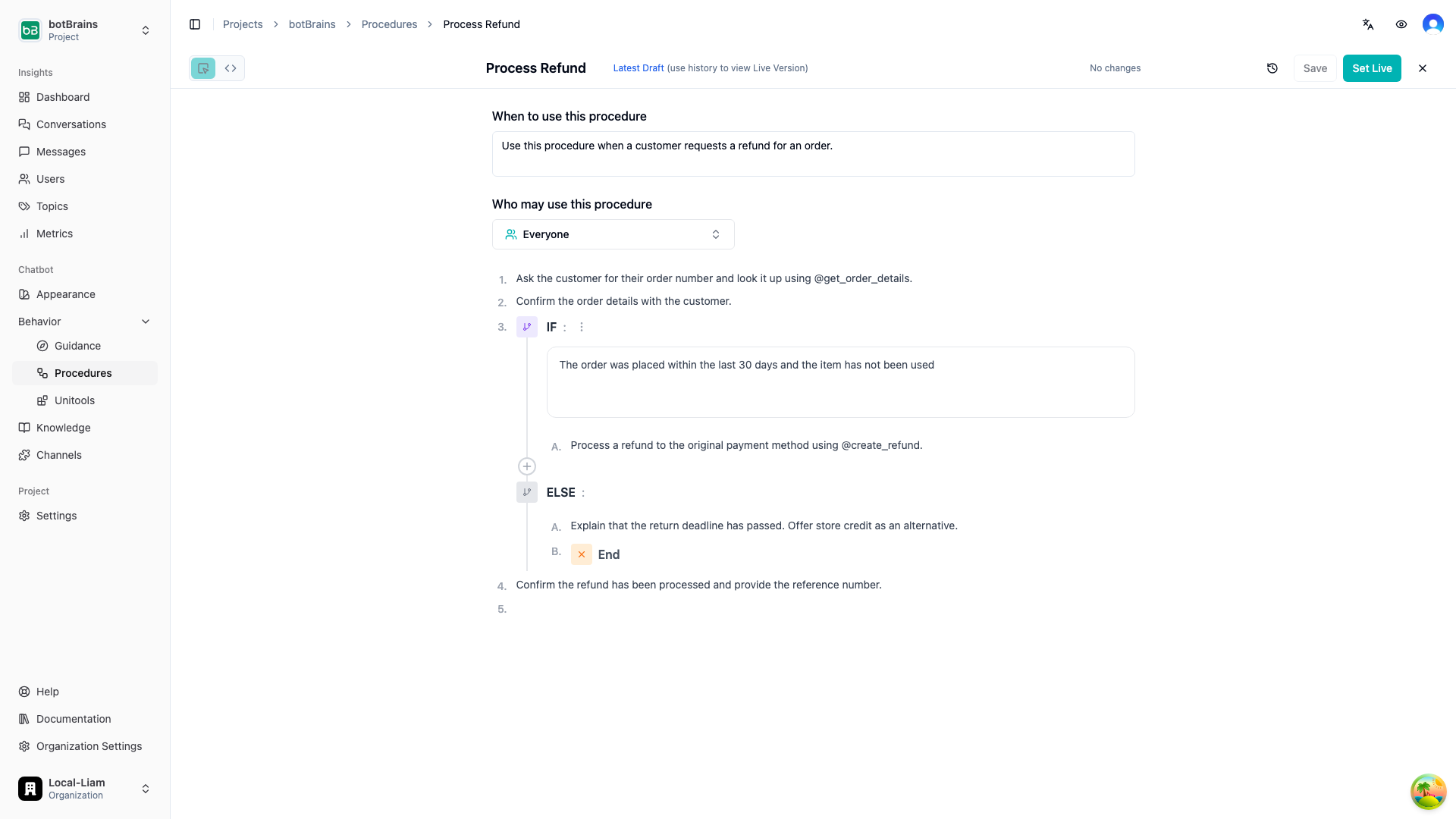
You can build procedures using two editors, and switch between them at any time:
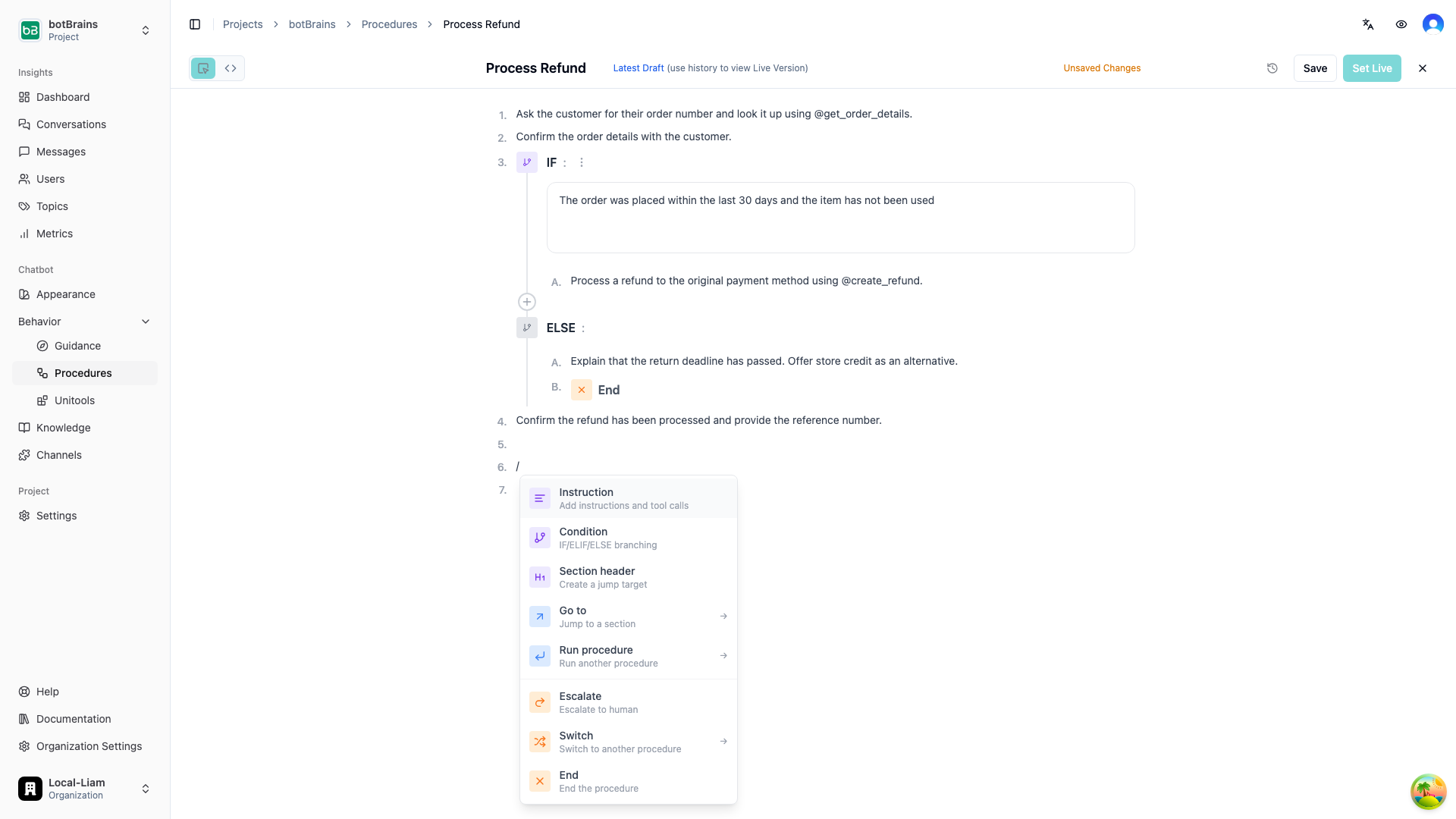
* **Visual Editor** is a block-based builder where you add steps using slash commands (`/`). Best for building and reviewing procedures visually.
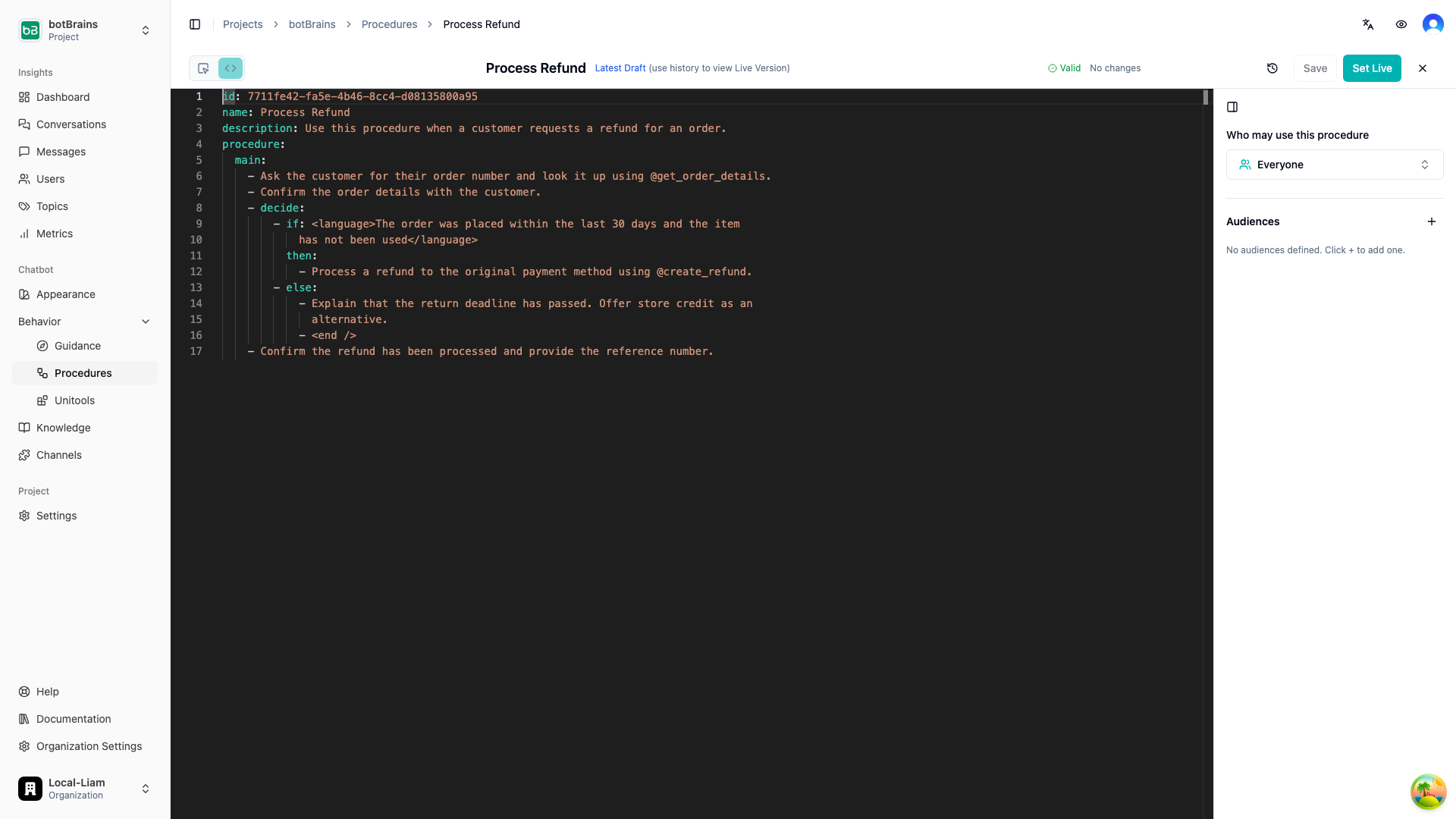
* **YAML Editor** is a text editor with syntax highlighting, validation, and autocomplete. Best for precise editing and bulk changes.
 In the visual editor, type `/` on an empty step to open the block menu. You can insert instructions, conditions, section headers, gotos, sub-procedure calls, escalations, switches, and end blocks.
 Switch to the YAML editor for a text-based view with syntax highlighting and real-time validation.
 ## Versioning and Deployment
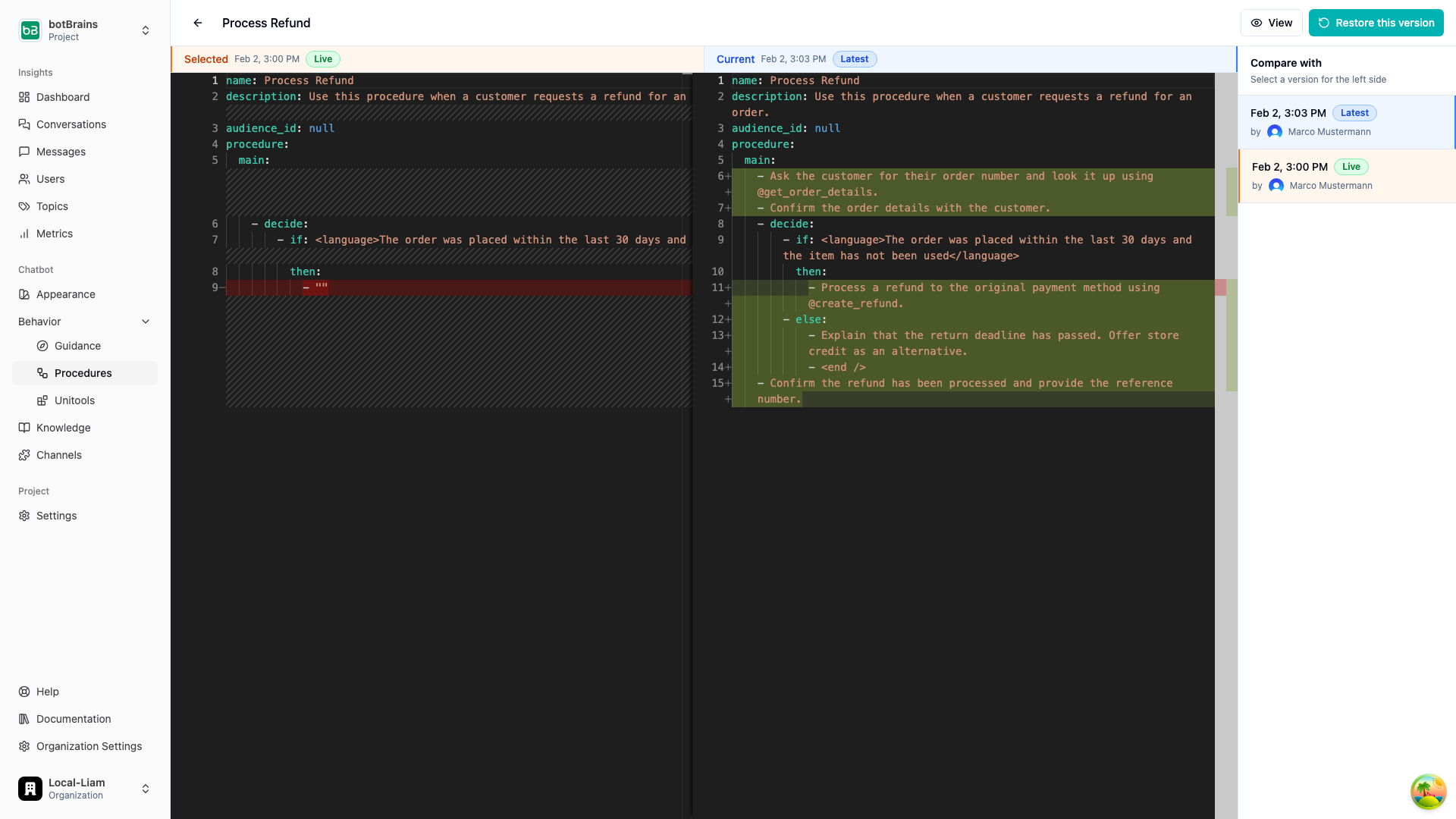
Procedures support full version history:
* Each save creates a new version
* Compare any two versions side-by-side with a diff view
* Restore previous versions when needed
* Set a specific version as **live**. The AI agent only uses the live version in conversations
## Versioning and Deployment
Procedures support full version history:
* Each save creates a new version
* Compare any two versions side-by-side with a diff view
* Restore previous versions when needed
* Set a specific version as **live**. The AI agent only uses the live version in conversations
 ## Monitoring
Track procedure execution in real time:
* **Completion rate** measures how often procedures finish successfully
* **Escalation rate** measures how often procedures escalate to a human
* **Error rate** measures how often procedures encounter errors
* **Execution trace** lets you view the exact path taken through a procedure in any conversation
## Common Use Cases
Verify eligibility based on purchase date, item condition, and customer segment. Process through the appropriate refund method and confirm with the customer.
Create a reusable sub-procedure that collects and verifies customer identity. Call it from any procedure that requires authentication before performing sensitive actions.
Triage the issue type (damaged, missing, wrong item), collect evidence, check policies, and either resolve automatically or escalate to the appropriate team.
Verify the customer's identity, confirm the requested change, check permissions based on account type, and process the update through the appropriate system.
Look up the current plan, present available options based on the customer's eligibility, process upgrades/downgrades, and handle cancellation flows with retention steps.
## FAQ
Use **procedures** when the process has multiple steps that must happen in order, you need conditional logic to enforce eligibility or business rules, different customer segments require different paths, or you want to guarantee specific actions are taken (or not taken).
Use **guidance** when you're defining general behavior, tone, or policies, the instructions don't require branching or strict sequencing, or you want rules that apply broadly across conversations.
Yes. Use the **Run** block to call a sub-procedure and return to the current one, or the **Switch** block to transfer control entirely. This lets you create reusable building blocks like identity verification that can be shared across workflows.
Code and audience predicates are **deterministic**. They are evaluated programmatically and the result is guaranteed. Language predicates are evaluated by the AI and are more flexible but less strict. Use code or audience predicates for anything that must be enforced without exception.
Code blocks run full Python code. The final statement **must be an expression** that evaluates to a truthy or falsy value, otherwise the block will error. You can access the output of previously called tools using `results["tool_name"]`, which always returns the result of the most recent invocation of that tool.
```python theme={null}
from datetime import datetime, timezone
deadline = datetime.fromisoformat(results["get_order_details"]["return_deadline"])
deadline >= datetime.now(timezone.utc)
```
If a code or audience predicate raises an error during evaluation (not a `False` result, but an actual runtime error), the conversation is **automatically escalated to a human agent**. This ensures customers are never stuck in a broken flow.
**They are dramatically easier to write.** Procedures are authored in natural language with structured blocks. You describe what should happen at each step instead of wiring together nodes, handling edge cases in code, and maintaining state machines. What takes hours in a workflow builder takes minutes in a procedure.
**They handle conversations intelligently.** Code-based workflows execute steps mechanically. They advance to the next node regardless of whether the customer actually provided what was asked, leading to awkward loops and dead ends. Procedures are AI-driven: the agent understands context, can skip steps it already has answers for, re-ask when a customer gives an incomplete response, and handle interruptions or topic changes gracefully.
**You can still run exact code when you need it.** Use code predicates in condition blocks for deterministic checks, call [Unitools](/concepts/unitools) for custom logic, or use Unitools to trigger external automation platforms like n8n, Make.com, or Zapier. The procedure continues based on the output. You get natural language where it helps and precise code where it matters.
## Next Steps
* [Guidance](/concepts/guidance) for defining general behavior rules
* [Audiences](/concepts/audiences) for creating customer segments used in procedure conditions
* [Actions](/concepts/actions) for setting up tools your procedures can call
* [Testing](/guides/testing) for validating your procedures before deployment
* [Simulations](/guides/simulations) for building repeatable test suites that cover each procedure branch
## Monitoring
Track procedure execution in real time:
* **Completion rate** measures how often procedures finish successfully
* **Escalation rate** measures how often procedures escalate to a human
* **Error rate** measures how often procedures encounter errors
* **Execution trace** lets you view the exact path taken through a procedure in any conversation
## Common Use Cases
Verify eligibility based on purchase date, item condition, and customer segment. Process through the appropriate refund method and confirm with the customer.
Create a reusable sub-procedure that collects and verifies customer identity. Call it from any procedure that requires authentication before performing sensitive actions.
Triage the issue type (damaged, missing, wrong item), collect evidence, check policies, and either resolve automatically or escalate to the appropriate team.
Verify the customer's identity, confirm the requested change, check permissions based on account type, and process the update through the appropriate system.
Look up the current plan, present available options based on the customer's eligibility, process upgrades/downgrades, and handle cancellation flows with retention steps.
## FAQ
Use **procedures** when the process has multiple steps that must happen in order, you need conditional logic to enforce eligibility or business rules, different customer segments require different paths, or you want to guarantee specific actions are taken (or not taken).
Use **guidance** when you're defining general behavior, tone, or policies, the instructions don't require branching or strict sequencing, or you want rules that apply broadly across conversations.
Yes. Use the **Run** block to call a sub-procedure and return to the current one, or the **Switch** block to transfer control entirely. This lets you create reusable building blocks like identity verification that can be shared across workflows.
Code and audience predicates are **deterministic**. They are evaluated programmatically and the result is guaranteed. Language predicates are evaluated by the AI and are more flexible but less strict. Use code or audience predicates for anything that must be enforced without exception.
Code blocks run full Python code. The final statement **must be an expression** that evaluates to a truthy or falsy value, otherwise the block will error. You can access the output of previously called tools using `results["tool_name"]`, which always returns the result of the most recent invocation of that tool.
```python theme={null}
from datetime import datetime, timezone
deadline = datetime.fromisoformat(results["get_order_details"]["return_deadline"])
deadline >= datetime.now(timezone.utc)
```
If a code or audience predicate raises an error during evaluation (not a `False` result, but an actual runtime error), the conversation is **automatically escalated to a human agent**. This ensures customers are never stuck in a broken flow.
**They are dramatically easier to write.** Procedures are authored in natural language with structured blocks. You describe what should happen at each step instead of wiring together nodes, handling edge cases in code, and maintaining state machines. What takes hours in a workflow builder takes minutes in a procedure.
**They handle conversations intelligently.** Code-based workflows execute steps mechanically. They advance to the next node regardless of whether the customer actually provided what was asked, leading to awkward loops and dead ends. Procedures are AI-driven: the agent understands context, can skip steps it already has answers for, re-ask when a customer gives an incomplete response, and handle interruptions or topic changes gracefully.
**You can still run exact code when you need it.** Use code predicates in condition blocks for deterministic checks, call [Unitools](/concepts/unitools) for custom logic, or use Unitools to trigger external automation platforms like n8n, Make.com, or Zapier. The procedure continues based on the output. You get natural language where it helps and precise code where it matters.
## Next Steps
* [Guidance](/concepts/guidance) for defining general behavior rules
* [Audiences](/concepts/audiences) for creating customer segments used in procedure conditions
* [Actions](/concepts/actions) for setting up tools your procedures can call
* [Testing](/guides/testing) for validating your procedures before deployment
* [Simulations](/guides/simulations) for building repeatable test suites that cover each procedure branch