> ## Documentation Index
> Fetch the complete documentation index at: https://docs.botbrains.io/llms.txt
> Use this file to discover all available pages before exploring further.
# Business Analysis
> Understand customer query types and build a systematic improvement process
Before diving into configuration, it helps to understand how customer queries differ in complexity. This mental model guides your implementation strategy and helps you prioritize what to build first.
## The Three Buckets
All customer queries fall into three categories, each requiring different capabilities:
## Simple Questions
**Ask for information** without requiring customer-specific data.
*"How long does shipping take?"*
*"What is your refund policy?"*
***
**Requires:** Knowledge base
**Your role:** Upload knowledge, monitor, refine
## Personalized Questions
**Read access** to external systems for user-specific data.
*"Where is my order?"*
*"When does my subscription renew?"*
***
**Requires:** Auth, permissions, integrations
**Your role:** Work with botBrains to connect systems
## Tasks
**Write access** to external systems to take action.
*"Cancel my subscription."*
*"Update my invoice address."*
***
**Requires:** Permissions, business rules, confirmations
**Your role:** Define rules and workflows with botBrains
Bucket 1 (Simple Questions) is where you have full control-monitor conversations and improve answers using [Guidance](/concepts/guidance) and [Knowledge](/concepts/knowledge). Buckets 2 and 3 typically require collaboration with botBrains to set up integrations.
## Building Your Knowledge Foundation
Knowledge is foundational to all three buckets. Even personalized questions and tasks require context from your knowledge base. Here's how to build it systematically:
### Step 1: Ingest What You Know
Start by uploading knowledge you're confident is correct. Exclude anything that's likely outdated or possibly incorrect-it's better for the AI to say "I don't know" than to answer with wrong information.
**Good starting points:**
* Help center articles
* FAQ pages
* Product documentation
* Shipping and return policies
 ### Step 2: Use Data to Identify Gaps
Use botBrains analytics to discover what's missing:
* **[Topic AI](/concepts/topics)** - Identify common intents automatically
* **Escalated conversations** - Review what the AI couldn't handle
* **Unresolved conversations** - Find questions without satisfactory answers
* **[Resolution metrics](/concepts/metrics)** - Track improvement over time
This reveals what your AI can't currently answer and helps prioritize new content.
### Step 2: Use Data to Identify Gaps
Use botBrains analytics to discover what's missing:
* **[Topic AI](/concepts/topics)** - Identify common intents automatically
* **Escalated conversations** - Review what the AI couldn't handle
* **Unresolved conversations** - Find questions without satisfactory answers
* **[Resolution metrics](/concepts/metrics)** - Track improvement over time
This reveals what your AI can't currently answer and helps prioritize new content.
 ### Step 3: Capture Knowledge from Human Conversations
Customer calls, video chats, and support sessions are goldmines. With permission, record these sessions and:
1. Transcribe them
2. Extract question-answer pairs
3. Convert them into help center articles or [snippets](/concepts/snippets)
These transcripts reflect real scenarios and pain points, making them invaluable for training.
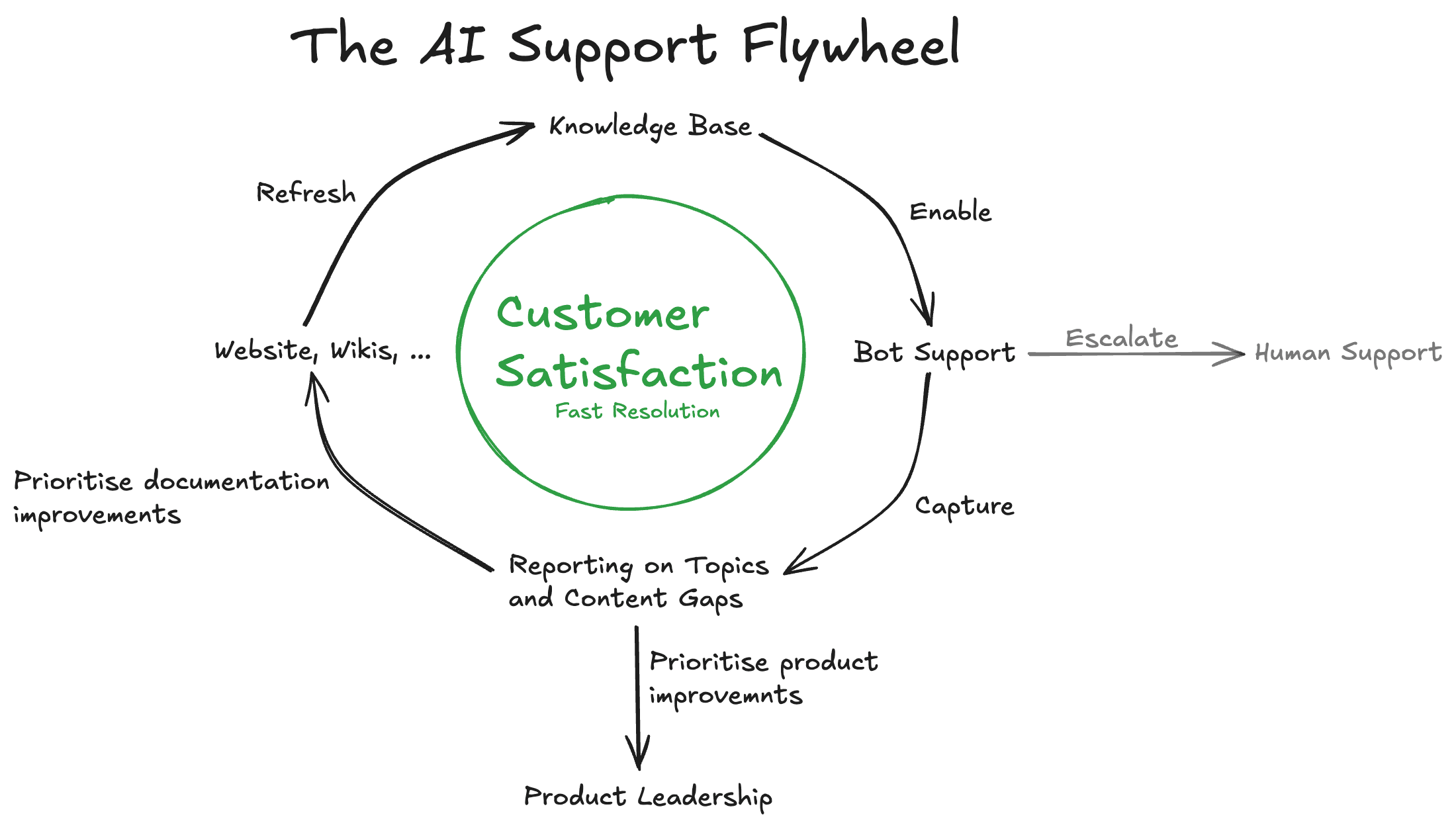
## The AI Support Flywheel
Improvement isn't a one-time effort-it's a continuous cycle:
### Step 3: Capture Knowledge from Human Conversations
Customer calls, video chats, and support sessions are goldmines. With permission, record these sessions and:
1. Transcribe them
2. Extract question-answer pairs
3. Convert them into help center articles or [snippets](/concepts/snippets)
These transcripts reflect real scenarios and pain points, making them invaluable for training.
## The AI Support Flywheel
Improvement isn't a one-time effort-it's a continuous cycle:
 ### Sustainable Process
Dedicate **1-3 hours per week** to:
1. Review unresolved conversations
2. Identify patterns in escalations
3. Convert findings into help center content or snippets
4. Update outdated information
After a few cycles, you should see improvements in:
* **Resolution rates** - More questions answered without escalation
* **Escalation reduction** - Fewer handoffs to human agents
* **Customer satisfaction** - Faster, more accurate responses
The best AI teams make small, frequent refinements based on real conversations rather than waiting for major overhauls. See [Improve Answers](/guides/improve-answers) for detailed workflows.
## Next Steps
Now that you understand the query types and improvement process:
* **[Quickstart](/getting-started/quickstart)** - Get your first AI agent running
* **[Platform Overview](/getting-started/overview)** - Learn the terminology
* **[Instruct AI Agent](/guides/instruct-ai-agent)** - Configure behavior and guidance
* **[Improve Answers](/guides/improve-answers)** - Systematic improvement workflows
### Sustainable Process
Dedicate **1-3 hours per week** to:
1. Review unresolved conversations
2. Identify patterns in escalations
3. Convert findings into help center content or snippets
4. Update outdated information
After a few cycles, you should see improvements in:
* **Resolution rates** - More questions answered without escalation
* **Escalation reduction** - Fewer handoffs to human agents
* **Customer satisfaction** - Faster, more accurate responses
The best AI teams make small, frequent refinements based on real conversations rather than waiting for major overhauls. See [Improve Answers](/guides/improve-answers) for detailed workflows.
## Next Steps
Now that you understand the query types and improvement process:
* **[Quickstart](/getting-started/quickstart)** - Get your first AI agent running
* **[Platform Overview](/getting-started/overview)** - Learn the terminology
* **[Instruct AI Agent](/guides/instruct-ai-agent)** - Configure behavior and guidance
* **[Improve Answers](/guides/improve-answers)** - Systematic improvement workflows