

Why Involvement Rate, Not Resolution Rate
In chat, the AI either resolves a conversation or it doesn’t-Resolution Rate captures this cleanly. In ticketing, human finishing is a normal, valuable outcome. A ticket where the AI drafts a response and a human sends it still saved significant agent time, but Resolution Rate counts this as a failure of autonomy. Every ticket falls into one of two buckets: involved (the AI participated) or not involved (the AI didn’t participate). Within involved tickets, three levels describe how the AI participated:
Involvement Rate counts all three levels together-it tells you what share of tickets the AI touches at all. Relative Autonomous Rate narrows the lens to just involved tickets and measures how many the AI handled fully on its own. Together they answer: “Does the AI participate?” and “When it does, how often does it resolve tickets without help?”
Single metrics
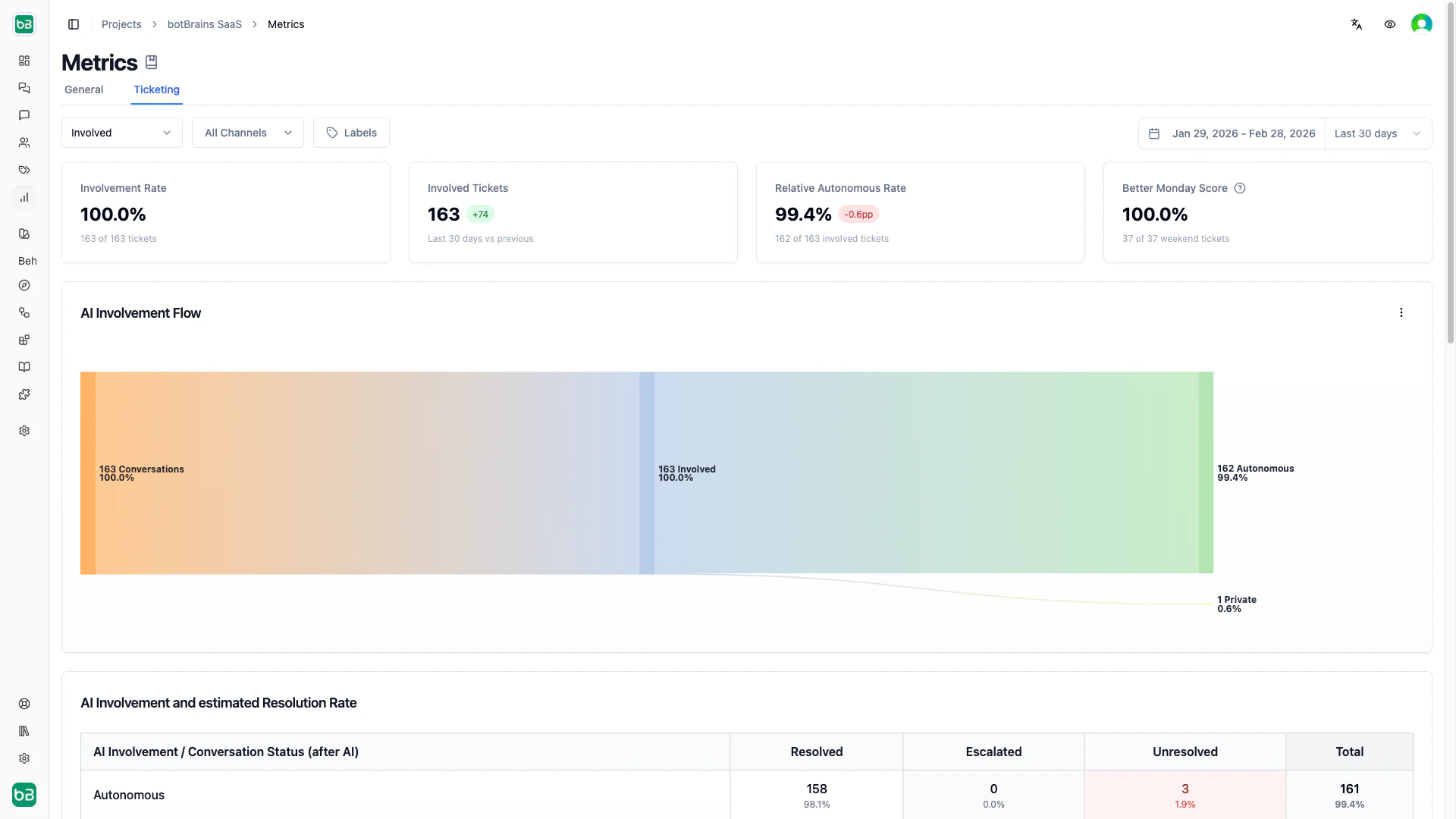
High involvement + low autonomy means the AI engages frequently but needs human finishing-focus on knowledge gaps. Low involvement + high autonomy means the AI is effective but underutilized-expand coverage to more ticket types.
Autonomous Rate is provisional until a ticket closes. A ticket counts as autonomous only while no human agent has sent a message on it. botBrains recomputes involvement on every reply, so it reclassifies the ticket the moment an agent steps in-a ticket that looks autonomous today becomes public tomorrow when a customer replies and an agent finishes the thread. Because recent windows contain many still-open tickets, their Relative Autonomous Rate starts high and settles downward as those tickets close. Read autonomous performance on windows that have had time to mature (last 30 days rather than today), and expect the most recent days to firm up over time.
Charts and Use Cases
Identifying Issues
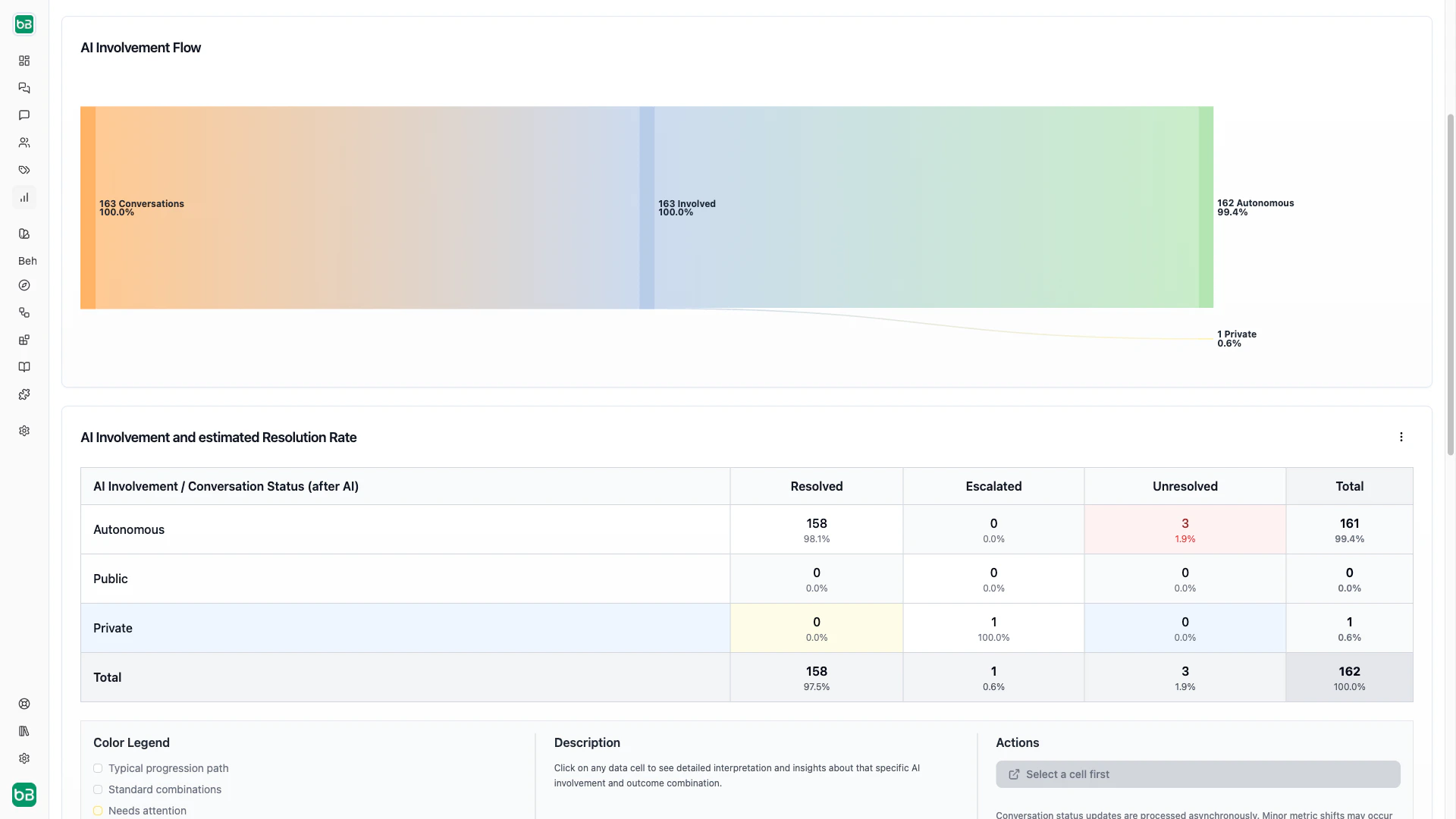
Convert public involvement to autonomous. Filter the Sankey diagram to public → resolved. Review what information humans added that the AI lacked. Extract those patterns into your knowledge base. Monitor whether those ticket types shift to autonomous → resolved. Reduce Monday backlog. Check the Better Monday Score. If it’s below 50%, filter to unanswered weekend tickets and review them by topic. Add knowledge for the most common weekend inquiry types and consider less aggressive escalation rules outside business hours. Find topics the AI can’t handle alone. Filter the Sankey to autonomous → escalated and group by topic on the topics dashboard. Decide for each topic: add knowledge (if information gap), create specific escalation rules (if legitimately complex), or improve guidance (if judgment issue). Measure ROI. Multiply the Involved Tickets count by your average ticket handling time to estimate agent hours saved. For a more precise calculation, use the Relative Autonomous Rate to isolate tickets that needed zero human time.Next Steps
- Metrics - Return to the dashboard overview and cross-channel comparison
- Conversations - Drill into individual tickets to understand metric patterns
- Topics - Segment ticket performance by topic
- Improve Answers - Use ticket insights to refine knowledge
- Data Providers - Add knowledge to increase autonomous resolution