

Why Use Procedures
Guidance tells your AI agent how to behave. Procedures tell it what to do, step by step, with enforced rules. The key difference: procedures support conditional branches with language, code, and audience rules. This means you can formally enforce that certain actions only happen when conditions match. Guarantee eligibility before processing a refund, verify identity before sharing account details, or restrict actions to specific customer segments.How Procedures Work
When a customer message matches a procedure’s trigger, the AI agent activates it and follows the defined steps. The agent still communicates in a conversational way, but the procedure’s structure governs its actions and decisions. Unlike rigid code-based workflows, the AI agent navigates procedures intelligently. It can complete multiple steps in a single response when it already has the information it needs, such as looking up an order and checking eligibility in one go. Equally, it can stay on a single step and re-ask the customer if they fail to provide the required information. The agent adapts to the conversation rather than advancing through a fixed sequence. You compose procedures from blocks. Each block represents a step or decision point.Condition Predicates
Conditions support three predicate types for branching:- Language predicates let the AI evaluate natural language conditions (for example, “the customer purchased the item within 30 days”)
- Code predicates run deterministic checks using code (for example, date calculations, amount thresholds)
- Audience predicates branch based on audience segments (for example, customer tier, channel, location)
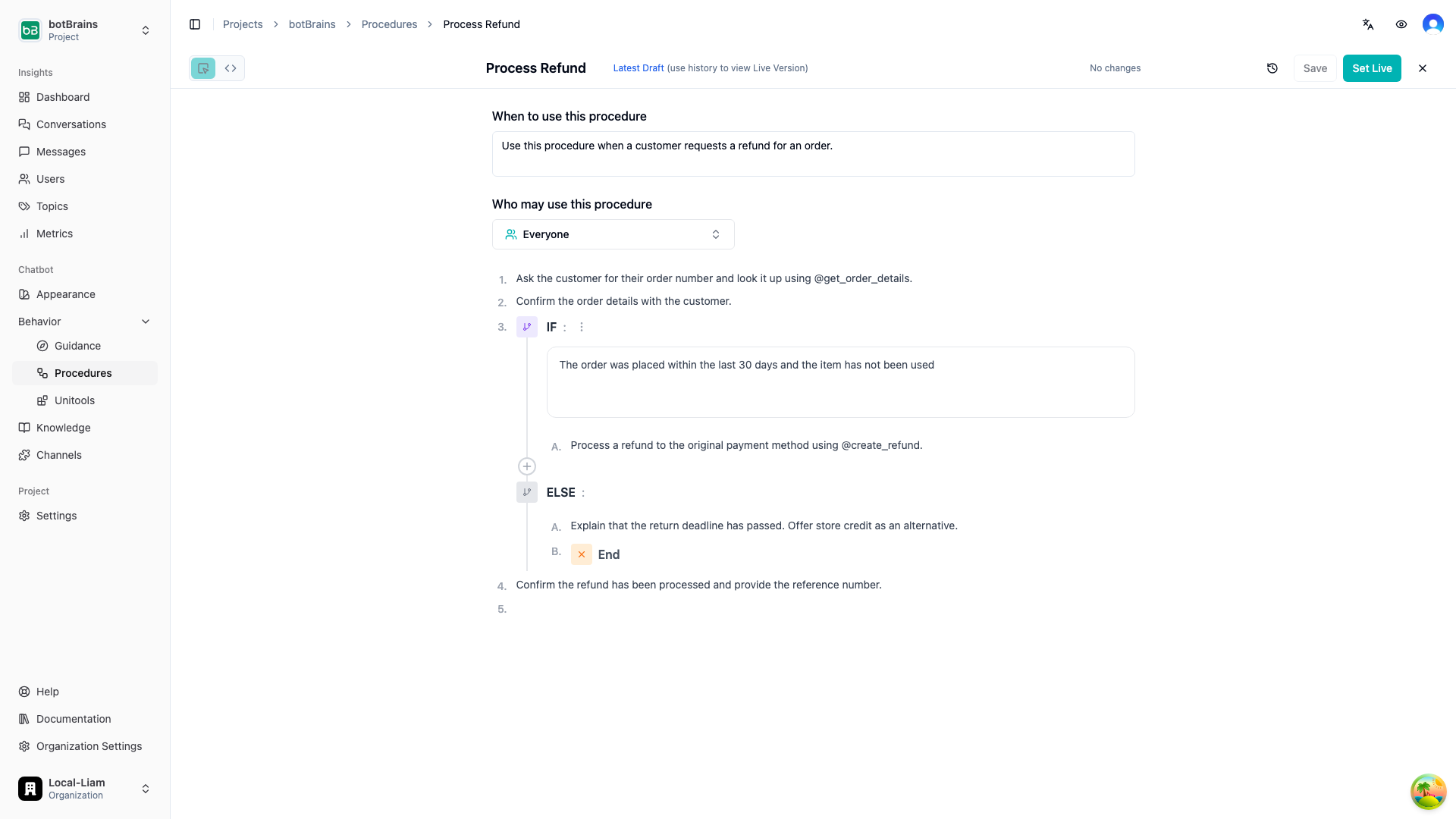
Example: Refund Request
@get_order_details via results["get_order_details"] and compares the return deadline against the current date. This guarantees that refunds are only processed when the return deadline hasn’t passed, enforced by code, not left to AI interpretation.
Editors
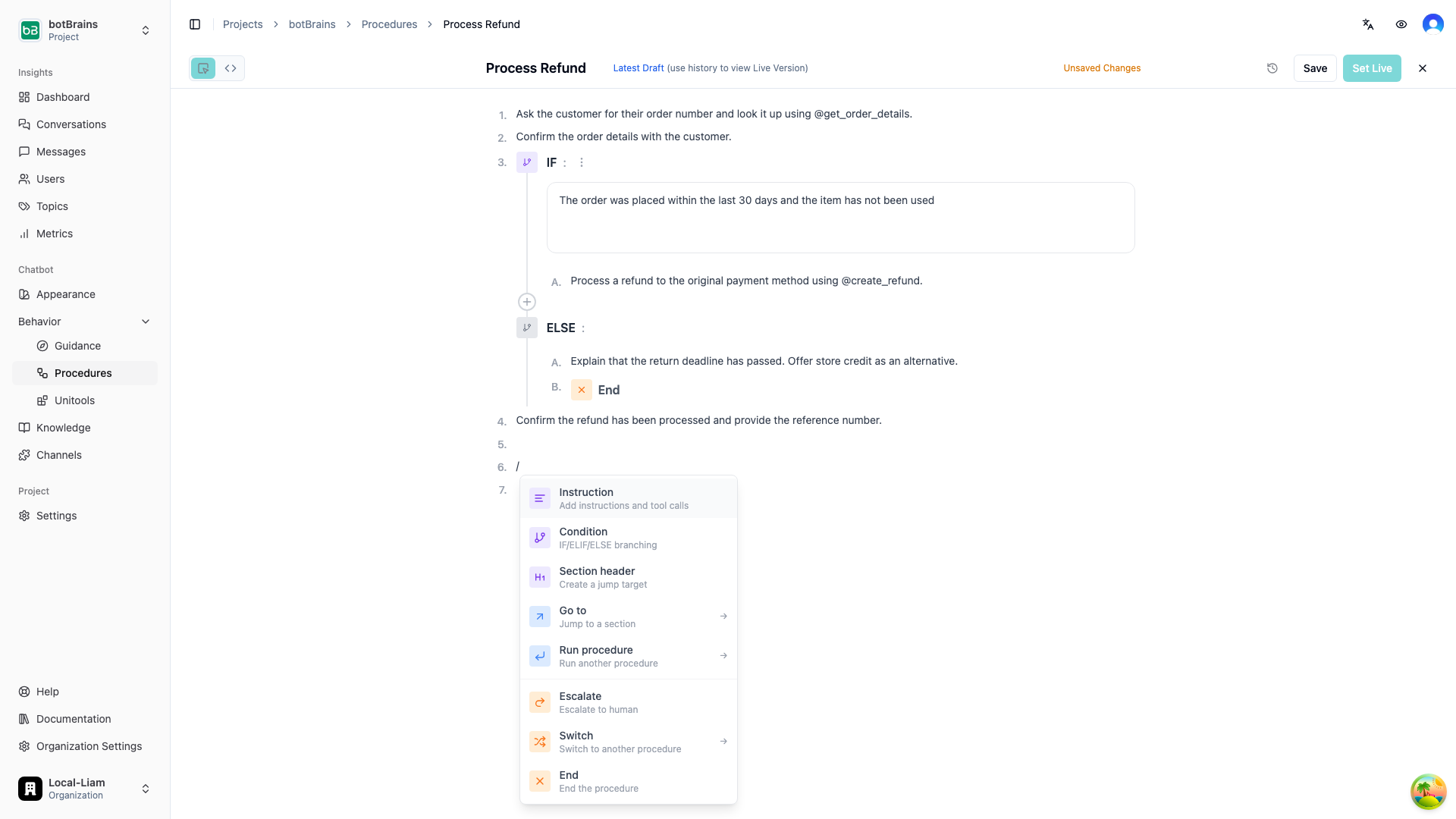
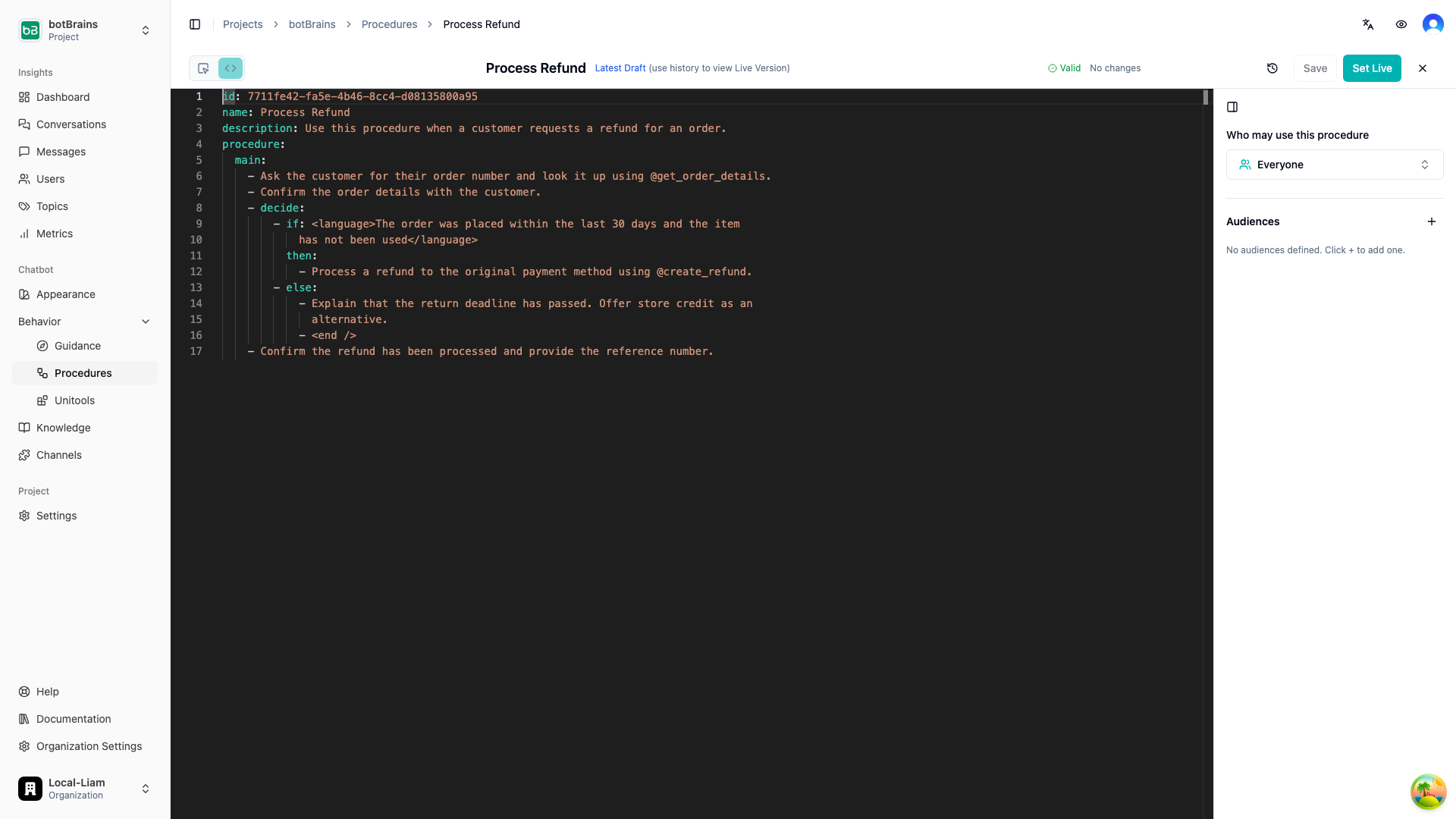
You can build procedures using two editors, and switch between them at any time:- Visual Editor is a block-based builder where you add steps using slash commands (
/). Best for building and reviewing procedures visually. - YAML Editor is a text editor with syntax highlighting, validation, and autocomplete. Best for precise editing and bulk changes.
/ on an empty step to open the block menu. You can insert instructions, conditions, section headers, gotos, sub-procedure calls, escalations, switches, and end blocks.
Versioning and Deployment
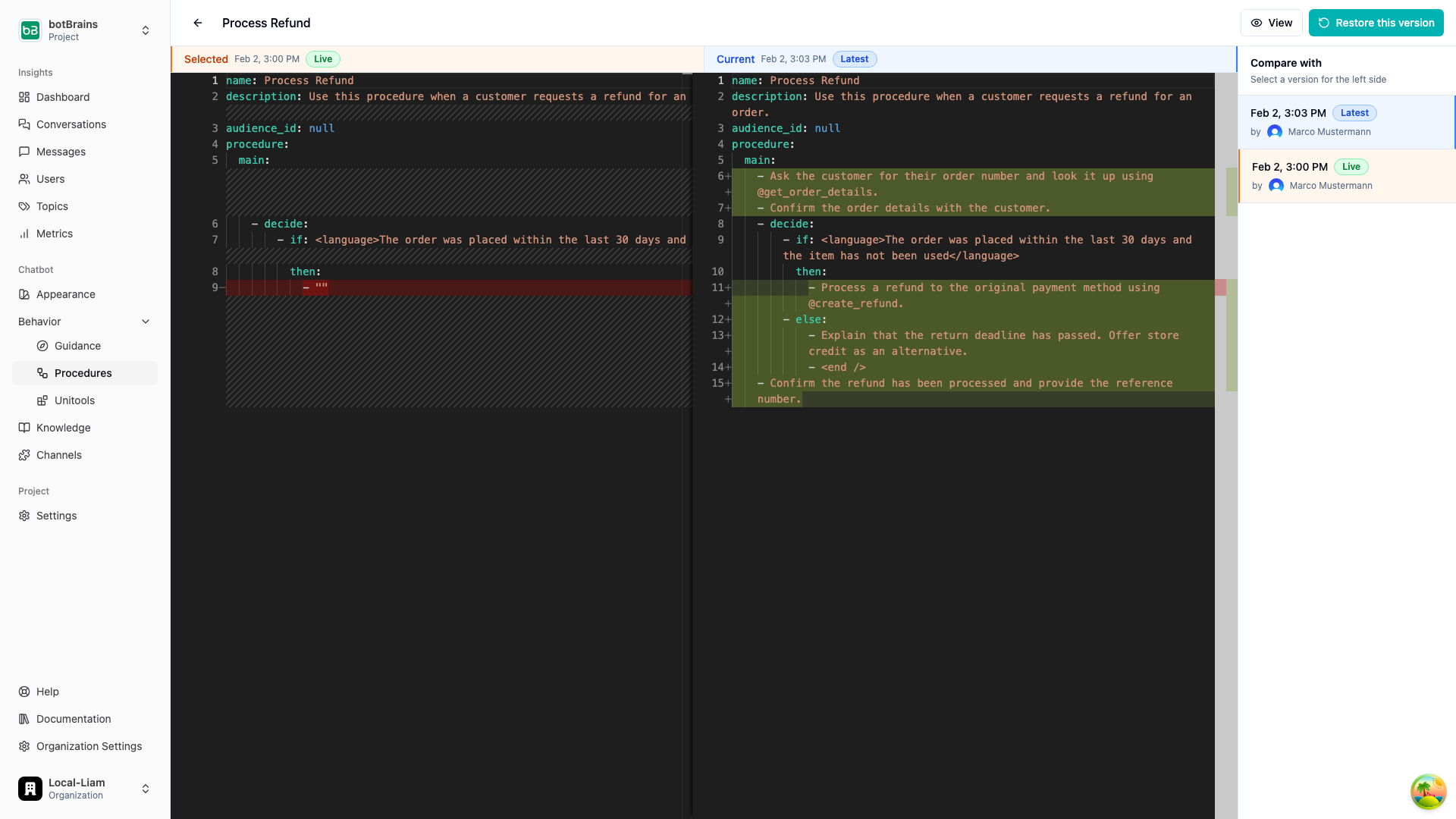
Procedures support full version history:- Each save creates a new version
- Compare any two versions side-by-side with a diff view
- Restore previous versions when needed
- Set a specific version as live. The AI agent only uses the live version in conversations
Monitoring
Track procedure execution in real time:- Completion rate measures how often procedures finish successfully
- Escalation rate measures how often procedures escalate to a human
- Error rate measures how often procedures encounter errors
- Execution trace lets you view the exact path taken through a procedure in any conversation
Common Use Cases
Refunds and Returns
Refunds and Returns
Verify eligibility based on purchase date, item condition, and customer segment. Process through the appropriate refund method and confirm with the customer.
Identity Verification
Identity Verification
Create a reusable sub-procedure that collects and verifies customer identity. Call it from any procedure that requires authentication before performing sensitive actions.
Order Issue Resolution
Order Issue Resolution
Triage the issue type (damaged, missing, wrong item), collect evidence, check policies, and either resolve automatically or escalate to the appropriate team.
Account Changes
Account Changes
Verify the customer’s identity, confirm the requested change, check permissions based on account type, and process the update through the appropriate system.
Subscription Management
Subscription Management
Look up the current plan, present available options based on the customer’s eligibility, process upgrades/downgrades, and handle cancellation flows with retention steps.
FAQ
When should I use a procedure instead of guidance?
When should I use a procedure instead of guidance?
Use procedures when the process has multiple steps that must happen in order, you need conditional logic to enforce eligibility or business rules, different customer segments require different paths, or you want to guarantee specific actions are taken (or not taken).Use guidance when you’re defining general behavior, tone, or policies, the instructions don’t require branching or strict sequencing, or you want rules that apply broadly across conversations.
Can procedures call other procedures?
Can procedures call other procedures?
Yes. Use the Run block to call a sub-procedure and return to the current one, or the Switch block to transfer control entirely. This lets you create reusable building blocks like identity verification that can be shared across workflows.
How are conditions enforced?
How are conditions enforced?
Code and audience predicates are deterministic. They are evaluated programmatically and the result is guaranteed. Language predicates are evaluated by the AI and are more flexible but less strict. Use code or audience predicates for anything that must be enforced without exception.
What values are available in code blocks?
What values are available in code blocks?
Code blocks run full Python code. The final statement must be an expression that evaluates to a truthy or falsy value, otherwise the block will error. You can access the output of previously called tools using
results["tool_name"], which always returns the result of the most recent invocation of that tool.What happens if a condition fails to evaluate?
What happens if a condition fails to evaluate?
If a code or audience predicate raises an error during evaluation (not a
False result, but an actual runtime error), the conversation is automatically escalated to a human agent. This ensures customers are never stuck in a broken flow.Why would I use procedures over code-based workflows?
Why would I use procedures over code-based workflows?
They are dramatically easier to write. Procedures are authored in natural language with structured blocks. You describe what should happen at each step instead of wiring together nodes, handling edge cases in code, and maintaining state machines. What takes hours in a workflow builder takes minutes in a procedure.They handle conversations intelligently. Code-based workflows execute steps mechanically. They advance to the next node regardless of whether the customer actually provided what was asked, leading to awkward loops and dead ends. Procedures are AI-driven: the agent understands context, can skip steps it already has answers for, re-ask when a customer gives an incomplete response, and handle interruptions or topic changes gracefully.You can still run exact code when you need it. Use code predicates in condition blocks for deterministic checks, call Unitools for custom logic, or use Unitools to trigger external automation platforms like n8n, Make.com, or Zapier. The procedure continues based on the output. You get natural language where it helps and precise code where it matters.
Next Steps
- Guidance for defining general behavior rules
- Audiences for creating customer segments used in procedure conditions
- Actions for setting up tools your procedures can call
- Testing for validating your procedures before deployment
- Simulations for building repeatable test suites that cover each procedure branch